
best media optimizer for wordpress


Choosing the right media optimizer for WordPress can make a big difference in your site’s performance. A good plugin will compress images, optimize file sizes, and improve load times without sacrificing quality. Since slow media files are one of the most common reasons for sluggish websites, picking the right tool is essential for keeping visitors engaged and improving SEO.
Not all media optimizers are created equal. Some focus on lossless compression, while others offer advanced features like lazy loading, WebP conversion, or CDN integration. The best option depends on your specific needs—whether you prioritize speed, automation, or ease of use. Below, I’ve put together a straightforward list of the best media optimizers for WordPress to help you decide.
📋 Table of Contents
1. Smush
Smush is one of the most popular and user-friendly media optimization plugins for WordPress. Developed by WPMU DEV, it offers both free and premium versions, making it accessible for beginners and advanced users alike. Smush automatically compresses images without sacrificing quality, which helps improve your site’s loading speed—a critical factor for SEO and user experience. The plugin supports bulk optimization, allowing you to compress up to 50 images at once, and it integrates seamlessly with popular page builders like Elementor and Divi. Smush also includes lazy loading, which delays the loading of offscreen images until they’re needed, further boosting performance. It’s an excellent choice for bloggers, e-commerce sites, and businesses that rely heavily on visual content but don’t want to compromise on speed or quality.
- Lossless Compression: Smush compresses images without reducing their visual quality, ensuring your site remains fast without sacrificing aesthetics.
- Bulk Optimization: Optimize up to 50 images at once with a single click, saving you time and effort.
- Lazy Loading: Delays the loading of images until they’re visible on the screen, improving page load times and user experience.
- CDN Integration: Works with WPMU DEV’s CDN to deliver images faster globally, reducing server load and improving performance.
- Automatic Resizing: Automatically resizes large images to fit your site’s dimensions, preventing oversized files from slowing down your site.
2. ShortPixel Image Optimizer
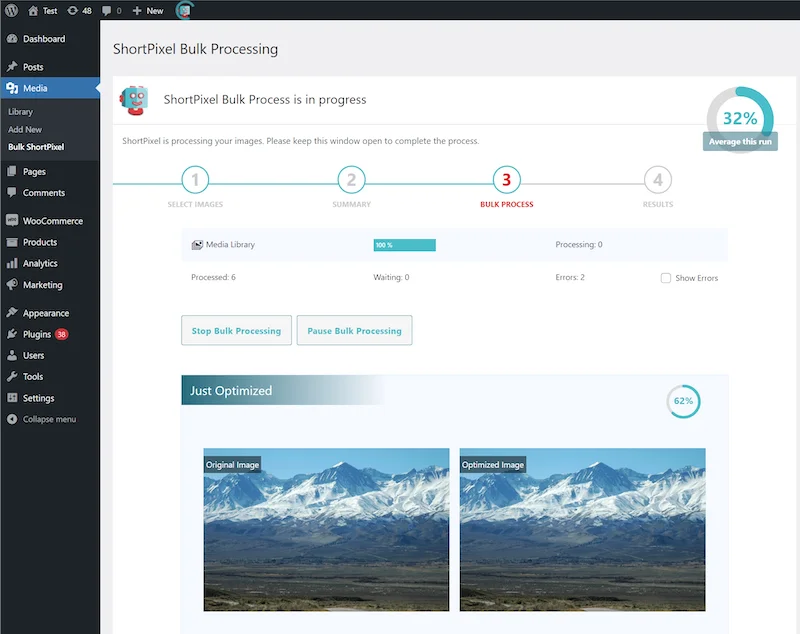
ShortPixel is a powerful and versatile image optimization plugin that stands out for its ability to compress images in multiple formats, including JPEG, PNG, GIF, PDF, and even WebP. It offers both lossy and lossless compression, giving you control over the balance between file size and image quality. ShortPixel also includes a feature to convert images to the modern WebP format, which is smaller and faster-loading than traditional formats. The plugin works in the cloud, meaning it doesn’t use your server’s resources, which is a huge plus for shared hosting environments. ShortPixel is ideal for photographers, e-commerce sites, and anyone who needs high-quality images without the bulk. It also offers a generous free tier, making it accessible for small websites and blogs.
- Multi-Format Support: Compresses JPEG, PNG, GIF, PDF, and WebP images, ensuring compatibility with all types of visual content.
- Lossy and Lossless Compression: Choose between aggressive compression (lossy) for maximum file size reduction or gentle compression (lossless) for minimal quality loss.
- WebP Conversion: Automatically converts images to the WebP format, which offers superior compression and faster loading times.
- Cloud-Based Processing: Optimizes images in the cloud, reducing the load on your server and speeding up the process.
- Bulk Optimization: Optimize all your existing images with a single click, saving time and effort.
3. Imagify

Imagify is a user-friendly image optimization plugin developed by the team behind WP Rocket, a popular caching plugin. It offers three levels of compression—Normal, Aggressive, and Ultra—allowing you to choose the best balance between file size and image quality. Imagify also supports WebP conversion and provides an option to resize images based on your site’s dimensions. One of its standout features is the ability to optimize images directly from the WordPress media library, making it incredibly easy to use. Imagify is perfect for bloggers, small businesses, and anyone who wants a simple yet effective way to optimize their images without technical hassle. The plugin also includes a backup feature, so you can restore original images if needed.
- Three Compression Levels: Choose between Normal (lossless), Aggressive (moderate compression), and Ultra (maximum compression) to suit your needs.
- WebP Conversion: Automatically converts images to WebP format for faster loading and smaller file sizes.
- Bulk Optimization: Optimize all your existing images in one go, saving time and effort.
- Backup Original Images: Keeps a copy of your original images, allowing you to restore them if needed.
- Resize Images: Automatically resizes images to fit your site’s dimensions, preventing oversized files from slowing down your site.
4. EWWW Image Optimizer
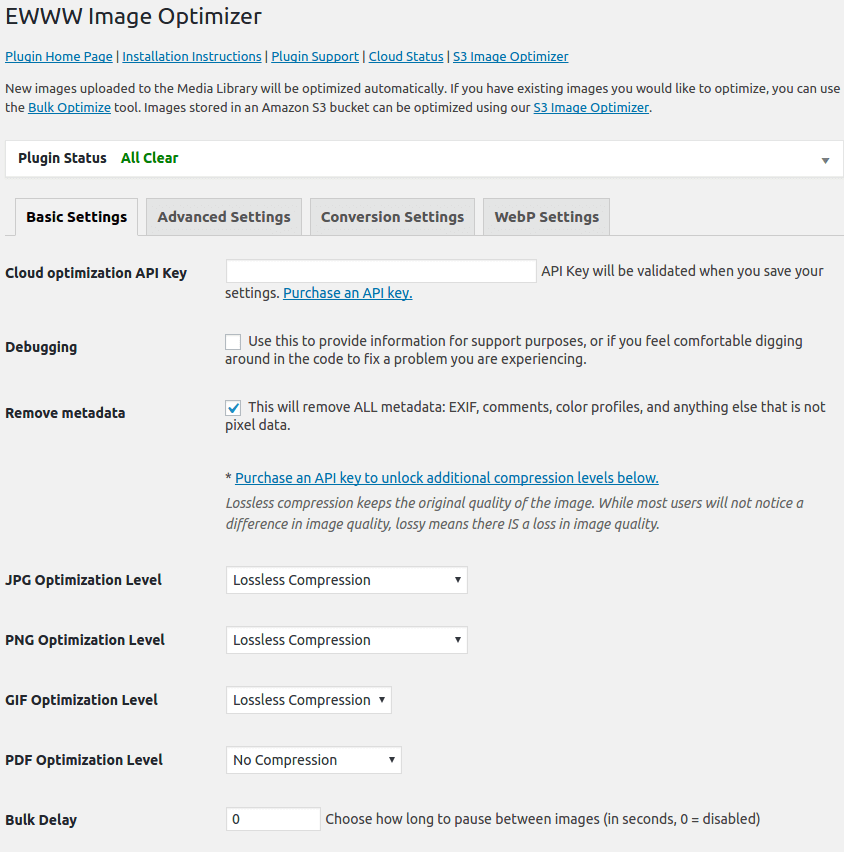
EWWW Image Optimizer is a robust and flexible plugin that offers both local and cloud-based image optimization. Unlike many other plugins, EWWW allows you to optimize images directly on your server, which can be more cost-effective for high-traffic sites. It supports a wide range of image formats, including JPEG, PNG, GIF, and PDF, and offers both lossy and lossless compression. EWWW also includes a feature to convert images to WebP format and provides lazy loading to improve page load times. One of its unique features is the ability to optimize images outside the WordPress media library, such as those in theme folders or custom directories. This makes it a great choice for developers and advanced users who need more control over their image optimization process.
- Local and Cloud Optimization: Optimize images on your server or in the cloud, giving you flexibility and cost savings.
- Multi-Format Support: Compresses JPEG, PNG, GIF, and PDF files, ensuring all your visual content is optimized.
- WebP Conversion: Converts images to WebP format for faster loading and smaller file sizes.
- Lazy Loading: Delays the loading of offscreen images until they’re needed, improving page load times.
- Optimize Non-Media Library Images: Optimize images in theme folders, custom directories, and other locations outside the WordPress media library.
5. Optimole
Optimole is a cloud-based image optimization service that takes a unique approach to media optimization. Instead of just compressing images, Optimole dynamically serves optimized images based on the user’s device and screen size. This ensures that visitors always get the best possible version of your images without unnecessary bloat. The plugin also includes lazy loading, automatic resizing, and WebP conversion, all handled in the cloud. Optimole is ideal for websites with a global audience, as it uses a CDN to deliver images quickly from servers around the world. It’s particularly well-suited for e-commerce sites, portfolios, and blogs that need to deliver high-quality images without sacrificing performance. The free plan is generous, making it accessible for small websites and blogs.
- Dynamic Image Serving: Delivers optimized images based on the user’s device and screen size, ensuring the best possible performance.
- Cloud-Based Optimization: Optimizes and delivers images from the cloud, reducing the load on your server.
- Lazy Loading: Delays the loading of offscreen images until they’re needed, improving page load times.
- CDN Integration: Uses a global CDN to deliver images quickly from servers around the world.
- Automatic Resizing: Automatically resizes images to fit the user’s screen, preventing oversized files from slowing down your site.
6. TinyPNG (Compress JPEG & PNG Images)

TinyPNG is a well-known image compression service that offers a WordPress plugin to optimize JPEG and PNG images. The plugin uses TinyPNG’s API to compress images in the cloud, reducing file sizes by up to 80% without noticeable quality loss. It supports bulk optimization and can automatically optimize new images as they’re uploaded to your media library. TinyPNG is incredibly easy to use, making it a great choice for beginners and non-technical users. The free version allows you to compress up to 500 images per month, which is generous for small websites and blogs. For larger sites, paid plans are available at affordable rates. TinyPNG is ideal for bloggers, small businesses, and anyone who wants a simple and effective way to optimize their images.
- Cloud-Based Compression: Uses TinyPNG’s API to compress images in the cloud, ensuring fast and efficient optimization.
- Bulk Optimization: Optimize all your existing images with a single click, saving time and effort.
- Automatic Optimization: Automatically optimizes new images as they’re uploaded to your media library.
- High Compression Rates: Reduces file sizes by up to 80% without noticeable quality loss.
- Easy to Use: Simple and intuitive interface, making it accessible for beginners and non-technical users.
7. WP Compress
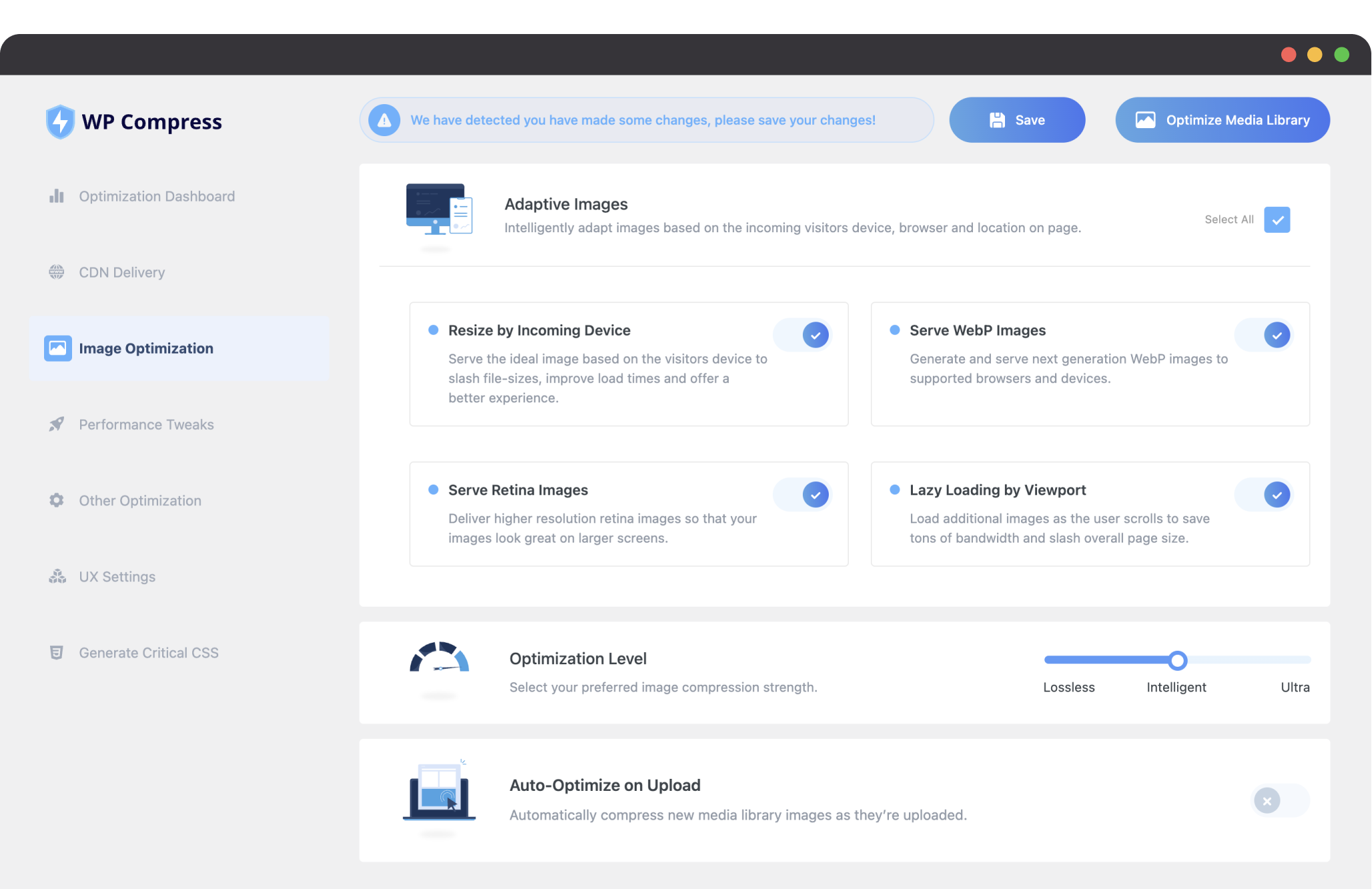
WP Compress is a powerful and feature-rich image optimization plugin that offers both local and cloud-based optimization. It supports a wide range of image formats, including JPEG, PNG, GIF, and WebP, and provides both lossy and lossless compression. WP Compress also includes lazy loading, automatic resizing, and WebP conversion, making it a comprehensive solution for media optimization. One of its standout features is the ability to optimize images in real-time as they’re uploaded, ensuring your site always performs at its best. WP Compress is ideal for e-commerce sites, photographers, and businesses that need high-quality images without the bulk. The plugin offers a free trial, and paid plans are available at competitive rates.
- Local and Cloud Optimization: Optimize images on your server or in the cloud, giving you flexibility and cost savings.
- Real-Time Optimization: Optimizes images as they’re uploaded, ensuring your site always performs at its best.
- WebP Conversion: Converts images to WebP format for faster loading and smaller file sizes.
- Lazy Loading: Delays the loading of offscreen images until they’re needed, improving page load times.
- Automatic Resizing: Automatically resizes images to fit your site’s dimensions, preventing oversized files from slowing down your site.
8. Kraken.io Image Optimizer
Kraken.io is a professional-grade image optimization service that offers a WordPress plugin to compress and optimize your images. It supports JPEG, PNG, GIF, and SVG formats and provides both lossy and lossless compression. Kraken.io also includes a feature to convert images to WebP format and offers a powerful API for developers who need more control over their optimization process. The plugin is easy to use and integrates seamlessly with the WordPress media library. Kraken.io is ideal for businesses, developers, and anyone who needs a high-performance image optimization solution. The free version allows you to optimize up to 100MB of images, and paid plans are available for larger sites.
- Multi-Format Support: Compresses JPEG, PNG, GIF, and SVG images, ensuring all your visual content is optimized.
- Lossy and Lossless Compression: Choose between aggressive compression (lossy) for maximum file size reduction or gentle compression (lossless) for minimal quality loss.
- WebP Conversion: Converts images to WebP format for faster loading and smaller file sizes.
- Developer-Friendly API: Offers a powerful API for developers who need more control over their optimization process.
- Bulk Optimization: Optimize all your existing images with a single click, saving time and effort.
9. Robin Image Optimizer
Robin Image Optimizer is a lightweight and efficient plugin that focuses on simplicity and performance. It offers both lossy and lossless compression for JPEG and PNG images and includes a feature to convert images to WebP format. Robin Image Optimizer is designed to be fast and resource-friendly, making it a great choice for shared hosting environments. The plugin also includes bulk optimization and automatic optimization for new images, ensuring your site always performs at its best. Robin Image Optimizer is ideal for bloggers, small businesses, and anyone who wants a no-fuss solution for image optimization. The free version is fully functional, and a premium version is available for advanced features.
- Lossy and Lossless Compression: Choose between aggressive compression (lossy) for maximum file size reduction or gentle compression (lossless) for minimal quality loss.
- WebP Conversion: Converts images to WebP format for faster loading and smaller file sizes.
- Bulk Optimization: Optimize all your existing images with a single click, saving time and effort.
- Automatic Optimization: Automatically optimizes new images as they’re uploaded to your media library.
- Lightweight and Fast: Designed to be resource-friendly, making it ideal for shared hosting environments.
10. ImageRecycle
ImageRecycle is a comprehensive image and PDF optimization plugin that offers both lossy and lossless compression. It supports JPEG, PNG, GIF, and PDF formats and includes a feature to convert images to WebP format. ImageRecycle also offers bulk optimization and automatic optimization for new files, making it a great choice for websites with large media libraries. One of its standout features is the ability to optimize PDF files, which is rare among image optimization plugins. ImageRecycle is ideal for businesses, e-commerce sites, and anyone who needs to optimize both images and PDFs. The plugin offers a free trial, and paid plans are available at competitive rates.
- Multi-Format Support: Compresses JPEG, PNG, GIF, and PDF files, ensuring all your visual content is optimized.
- Lossy and Lossless Compression: Choose between aggressive compression (lossy) for maximum file size reduction or gentle compression (lossless) for minimal quality loss.
- WebP Conversion: Converts images to WebP format for faster loading and smaller file sizes.
- PDF Optimization: Optimizes PDF files, reducing their file size without compromising quality.
- Bulk Optimization: Optimize all your existing files with a single click, saving time and effort.
Frequently Asked Questions
Why is image optimization important for WordPress sites?
Image optimization is crucial for WordPress sites because it directly impacts your site’s speed, performance, and user experience. Large, unoptimized images can slow down your site, leading to higher bounce rates and lower search engine rankings. Optimized images load faster, improving page load times and keeping visitors engaged. Additionally, search engines like Google consider page speed as a ranking factor, so optimizing your images can boost your SEO. Image optimization also reduces bandwidth usage, which is especially important for sites with high traffic or limited hosting resources. Overall, it’s a simple yet effective way to enhance your site’s performance and user experience.
What’s the difference between lossy and lossless compression?
Lossy and lossless compression are two different methods of reducing image file sizes, each with its own advantages. Lossy compression reduces file sizes by permanently removing some data from the image, which can result in a slight loss of quality. However, the quality loss is often negligible, and the reduction in file size can be significant. This makes lossy compression ideal for websites where speed is a priority. Lossless compression, on the other hand, reduces file sizes without removing any data, preserving the original quality of the image. While the file size reduction is smaller compared to lossy compression, lossless is perfect for images where quality is critical, such as product photos or professional portfolios. Many image optimization plugins offer both options, allowing you to choose the best method for your needs.
How does lazy loading improve my WordPress site’s performance?
Lazy loading is a technique that delays the loading of offscreen images until they’re needed, which can significantly improve your site’s performance. When a visitor lands on your page, only the images that are visible on their screen are loaded initially. As they scroll down, the remaining images load just before they come into view. This reduces the initial load time of your page, as fewer resources are required to render the content. Lazy loading is especially beneficial for long pages with many images, such as blog posts, galleries, or e-commerce product pages. It not only speeds up your site but also reduces bandwidth usage, which can lower your hosting costs. Many image optimization plugins include lazy loading as a feature, making it easy to implement on your WordPress site.
What is WebP, and why should I use it for my WordPress site?
WebP is a modern image format developed by Google that offers superior compression and quality compared to traditional formats like JPEG and PNG. WebP images are typically 25-35% smaller than their JPEG or PNG counterparts, which means they load faster and use less bandwidth. This makes WebP an excellent choice for improving your site’s performance and user experience. Additionally, WebP supports both lossy and lossless compression, as well as transparency and animation, making it a versatile format for all types of images. Most modern browsers support WebP, and many image optimization plugins can automatically convert your images to WebP format. By using WebP, you can significantly reduce your image file sizes without sacrificing quality, giving your site a performance boost.
Can I optimize images that are already uploaded to my WordPress site?
Yes, most image optimization plugins for WordPress allow you to optimize images that are already uploaded to your media library. This is typically done through a bulk optimization feature, which lets you compress all your existing images with a single click. Some plugins also offer the option to optimize images in batches, which is useful for sites with large media libraries. Additionally, many plugins can automatically optimize new images as they’re uploaded, ensuring your site always performs at its best. If you have a lot of images, it’s a good idea to back up your site before running bulk optimization, just in case. Overall, optimizing existing images is a great way to improve your site’s speed and performance without having to re-upload or replace your media files.
Do image optimization plugins work with page builders like Elementor or Divi?
Yes, most image optimization plugins are compatible with popular page builders like Elementor, Divi, and Beaver Builder. These plugins work at the media library level, so they optimize images regardless of how they’re used on your site. Some plugins even offer integrations with specific page builders, allowing you to optimize images directly from the builder’s interface. For example, Smush and Imagify both integrate seamlessly with Elementor, making it easy to optimize images as you build your pages. If you’re using a page builder, it’s a good idea to check the plugin’s documentation or website to ensure compatibility. Overall, image optimization plugins are designed to work with all types of WordPress sites, including those built with page builders.
How do I choose the best image optimization plugin for my WordPress site?
Choosing the best image optimization plugin for your WordPress site depends on your specific needs and priorities. Here are some factors to consider: 1) Compression Options: If you need maximum file size reduction, look for a plugin that offers lossy compression. If image quality is critical, choose one with lossless compression. 2) WebP Support: If you want to use the modern WebP format, ensure the plugin supports WebP conversion. 3) Bulk Optimization: If you have a large media library, look for a plugin that offers bulk optimization. 4) Ease of Use: If you’re a beginner, choose a plugin with a simple and intuitive interface. 5) Pricing: Consider your budget and whether the plugin offers a free version or trial. 6) Additional Features: Some plugins offer extra features like lazy loading, CDN integration, or PDF optimization, which may be useful for your site. By evaluating these factors, you can find the plugin that best fits your needs and helps you achieve your performance goals.


