
best wordpress backup plugin


Choosing the right backup plugin for WordPress is one of those decisions that can save you hours of frustration—or cost you dearly if you get it wrong. A good backup plugin should be reliable, easy to use, and flexible enough to handle everything from small blogs to large e-commerce sites. The best options automate the process, store backups securely, and let you restore your site quickly if something goes wrong. Not all plugins are created equal, though, and some come with hidden limitations or bloated features you’ll never use.
The market is crowded with options, but only a few stand out for their performance, support, and overall value. Some focus on simplicity, while others offer advanced features like incremental backups, cloud storage integration, and one-click restores. What matters most is finding a plugin that fits your specific needs without overcomplicating things. Below, I’ve assembled a list of the best WordPress backup plugins available right now.
📋 Table of Contents
1. UpdraftPlus
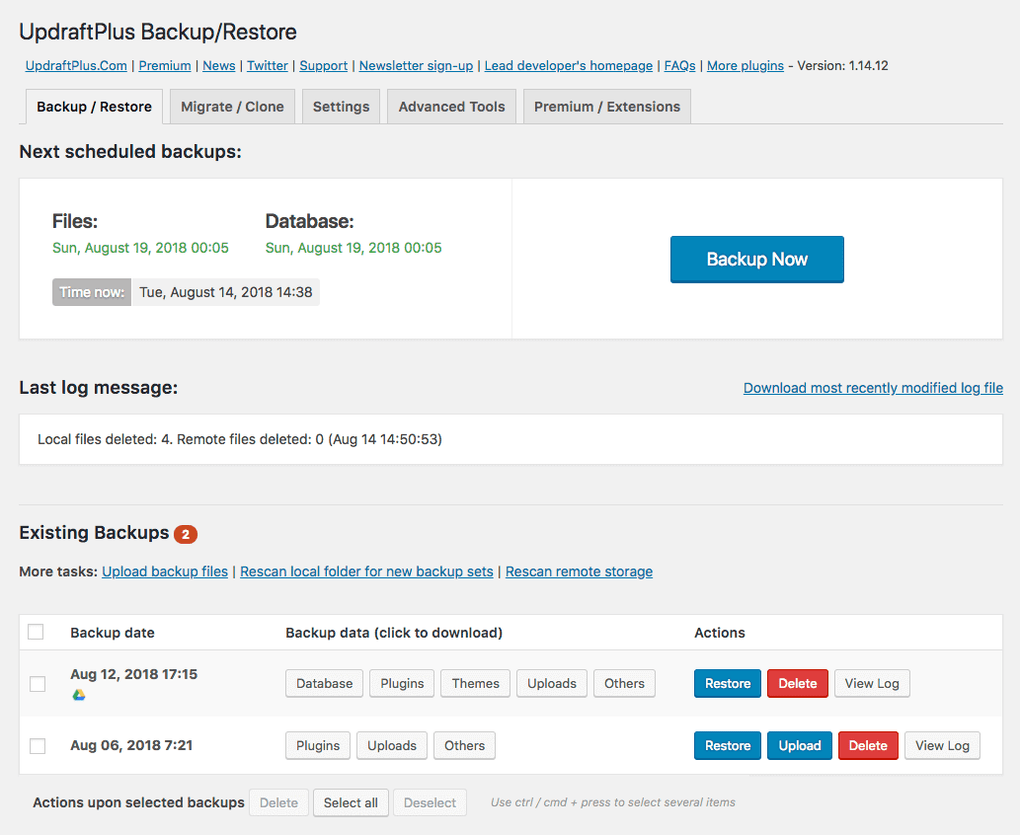
UpdraftPlus is one of the most popular WordPress backup plugins, trusted by over three million users. It simplifies the backup process by allowing you to schedule automatic backups of your entire website, including files, databases, plugins, and themes. What sets UpdraftPlus apart is its seamless integration with cloud storage services like Google Drive, Dropbox, Amazon S3, and more, ensuring your backups are safely stored off-site. The plugin also offers easy restoration options, so you can quickly recover your site in case of a crash or hack. UpdraftPlus is ideal for beginners and advanced users alike, thanks to its intuitive interface and robust features. It also includes a premium version with additional functionalities like incremental backups, database encryption, and priority support.
- Automated Backups: Schedule automatic backups of your WordPress site at regular intervals, ensuring you never lose important data.
- Cloud Storage Integration: Store backups in popular cloud services like Google Drive, Dropbox, Amazon S3, and more for added security.
- Easy Restoration: Restore your entire site or specific components (files, database, plugins) with just a few clicks.
- Incremental Backups: Available in the premium version, this feature backs up only the changes made since the last backup, saving time and storage space.
- Database Encryption: Encrypt your database backups for enhanced security, ensuring sensitive data remains protected.
2. BlogVault

BlogVault is a powerful and reliable WordPress backup plugin designed for users who need a hassle-free backup solution. Unlike many other plugins, BlogVault operates independently of your WordPress site, meaning it won’t slow down your website during backups. It offers real-time backups for WooCommerce sites, ensuring that every transaction and change is captured instantly. BlogVault also includes a built-in staging environment, allowing you to test updates and changes before applying them to your live site. The plugin is known for its high success rate in restoring sites, even in complex scenarios like server crashes or malware attacks. With its user-friendly dashboard and excellent customer support, BlogVault is a great choice for businesses and eCommerce sites that can’t afford downtime.
- Real-Time Backups: Automatically backs up changes in real-time, making it ideal for WooCommerce and high-traffic sites.
- Independent Backup System: Backups are stored on BlogVault’s servers, reducing the load on your website and ensuring faster performance.
- Built-In Staging: Create a staging environment to test updates, plugins, and themes before pushing them to your live site.
- One-Click Restoration: Restore your site quickly and easily, even if your site is completely down.
- Malware Scanning: Includes a malware scanner to detect and remove threats, keeping your site secure.
3. Jetpack Backup

Jetpack Backup, part of the Jetpack suite of tools, is a comprehensive backup solution for WordPress users. Developed by Automattic, the team behind WordPress.com, Jetpack Backup offers real-time backups for your site, ensuring that every change is captured instantly. One of its standout features is the ability to restore your site to any previous state with just one click, even if your site is completely down. Jetpack Backup also includes activity logging, so you can track changes made to your site and identify potential issues. The plugin is particularly well-suited for users who want a seamless, all-in-one solution for backups, security, and performance. With its cloud-based storage and easy-to-use interface, Jetpack Backup is a reliable choice for both beginners and experienced users.
- Real-Time Backups: Automatically backs up every change made to your site, ensuring no data is lost.
- One-Click Restoration: Restore your site to any previous state with a single click, even if your site is offline.
- Activity Log: Track all changes made to your site, including updates, plugin installations, and user actions.
- Cloud Storage: Backups are stored securely in the cloud, reducing the risk of data loss.
- Automated Security Scans: Includes security scanning to detect malware and vulnerabilities, keeping your site safe.
4. BackupBuddy
BackupBuddy is a premium WordPress backup plugin that has been a trusted name in the industry for over a decade. It offers a complete backup solution, allowing you to back up your entire site, including files, databases, plugins, and themes. One of BackupBuddy’s standout features is its ability to migrate your site to a new host or domain with ease. The plugin also includes a built-in malware scanner to detect and remove threats, as well as a staging environment for testing updates. BackupBuddy is ideal for users who need a robust, all-in-one backup solution with advanced features like scheduled backups, remote storage options, and easy restoration. With its user-friendly interface and excellent customer support, BackupBuddy is a great choice for both beginners and advanced users.
- Complete Site Backups: Back up your entire WordPress site, including files, databases, plugins, and themes.
- Site Migration: Easily migrate your site to a new host or domain with just a few clicks.
- Scheduled Backups: Set up automatic backups at regular intervals to ensure your data is always protected.
- Remote Storage Options: Store backups in remote locations like Amazon S3, Google Drive, Dropbox, and more.
- Malware Scanning: Includes a built-in malware scanner to detect and remove threats from your site.
5. Duplicator
Duplicator is a versatile WordPress plugin that excels at both backups and site migrations. While it’s primarily known for its migration capabilities, Duplicator also offers robust backup features, allowing you to create complete backups of your site, including files, databases, plugins, and themes. The plugin is particularly useful for developers and agencies who need to move sites between servers or create staging environments. Duplicator’s backup process is straightforward, and it includes options for manual and scheduled backups. The plugin also supports cloud storage services like Google Drive, Dropbox, and Amazon S3, ensuring your backups are safely stored off-site. With its powerful features and ease of use, Duplicator is a great choice for users who need a flexible backup and migration tool.
- Complete Site Backups: Create full backups of your WordPress site, including files, databases, and plugins.
- Site Migration: Easily migrate your site to a new host or domain with minimal downtime.
- Scheduled Backups: Set up automatic backups at regular intervals to keep your data safe.
- Cloud Storage Integration: Store backups in popular cloud services like Google Drive, Dropbox, and Amazon S3.
- Staging Environment: Create a staging site to test updates and changes before applying them to your live site.
6. VaultPress

VaultPress is a premium backup and security plugin developed by Automattic, the team behind WordPress.com. It offers real-time backups for your WordPress site, ensuring that every change is captured instantly. VaultPress is particularly well-suited for users who need a reliable, hands-off backup solution with minimal setup. The plugin includes automated security scanning to detect malware and vulnerabilities, as well as one-click restoration options for quick recovery. VaultPress is part of the Jetpack suite of tools, so it integrates seamlessly with other Jetpack features like performance optimization and site stats. With its cloud-based storage and easy-to-use interface, VaultPress is a great choice for users who want a simple yet powerful backup solution.
- Real-Time Backups: Automatically backs up every change made to your site, ensuring no data is lost.
- One-Click Restoration: Restore your site to any previous state with just one click, even if your site is down.
- Automated Security Scans: Includes security scanning to detect malware and vulnerabilities, keeping your site safe.
- Cloud Storage: Backups are stored securely in the cloud, reducing the risk of data loss.
- Spam Protection: Includes spam protection to keep your site’s comments and forms clean.
7. WP Time Capsule
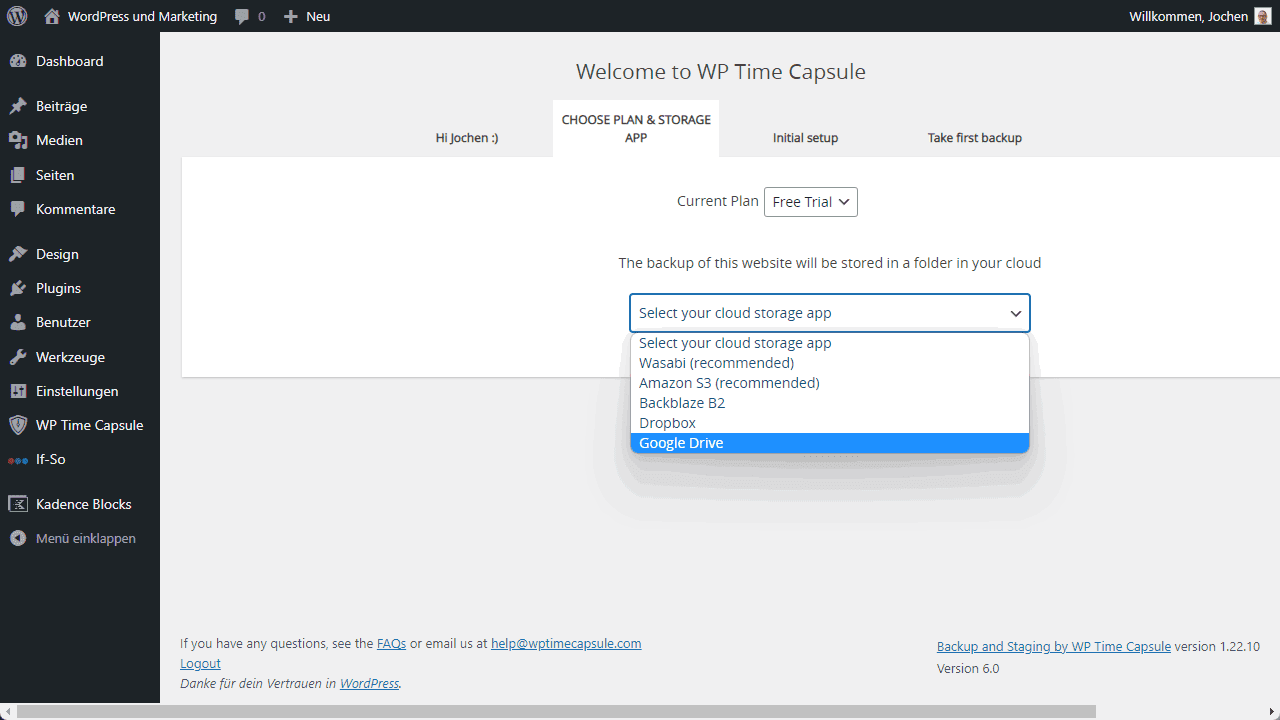
WP Time Capsule is a unique WordPress backup plugin that focuses on incremental backups, meaning it only backs up the changes made since the last backup. This approach saves time and storage space, making it ideal for users with large sites or limited server resources. WP Time Capsule also offers real-time backups for WooCommerce sites, ensuring that every transaction is captured instantly. The plugin includes a built-in staging environment for testing updates and changes, as well as one-click restoration options for quick recovery. With its cloud storage integration and user-friendly interface, WP Time Capsule is a great choice for users who need a lightweight yet powerful backup solution.
- Incremental Backups: Backs up only the changes made since the last backup, saving time and storage space.
- Real-Time Backups: Automatically backs up changes in real-time, making it ideal for WooCommerce sites.
- Built-In Staging: Create a staging environment to test updates and changes before applying them to your live site.
- One-Click Restoration: Restore your site quickly and easily with just one click.
- Cloud Storage Integration: Store backups in popular cloud services like Google Drive, Dropbox, and Amazon S3.
8. BackWPup
BackWPup is a free WordPress backup plugin that offers a comprehensive set of features for backing up your site. It allows you to create complete backups of your WordPress site, including files, databases, plugins, and themes, and store them in various locations like Dropbox, Amazon S3, and Google Drive. BackWPup also includes options for scheduled backups, so you can automate the process and ensure your data is always protected. The plugin is particularly well-suited for users who need a free, reliable backup solution with advanced features like database optimization and repair. With its user-friendly interface and robust functionality, BackWPup is a great choice for both beginners and advanced users.
- Complete Site Backups: Create full backups of your WordPress site, including files, databases, and plugins.
- Scheduled Backups: Set up automatic backups at regular intervals to keep your data safe.
- Cloud Storage Integration: Store backups in popular cloud services like Dropbox, Amazon S3, and Google Drive.
- Database Optimization: Optimize and repair your database to improve site performance.
- Multisite Support: Supports WordPress multisite installations, making it ideal for networks of sites.
9. All-in-One WP Migration
All-in-One WP Migration is a popular WordPress plugin that excels at both backups and site migrations. It allows you to create complete backups of your WordPress site, including files, databases, plugins, and themes, and export them to various cloud storage services. The plugin is particularly well-suited for users who need to migrate their site to a new host or domain, as it simplifies the process with its drag-and-drop interface. All-in-One WP Migration also includes options for scheduled backups and one-click restoration, making it a versatile tool for both backups and migrations. With its user-friendly interface and powerful features, All-in-One WP Migration is a great choice for users who need a flexible and reliable backup solution.
- Complete Site Backups: Create full backups of your WordPress site, including files, databases, and plugins.
- Site Migration: Easily migrate your site to a new host or domain with minimal downtime.
- Drag-and-Drop Interface: Simplifies the backup and migration process with an intuitive drag-and-drop interface.
- Cloud Storage Integration: Store backups in popular cloud services like Google Drive, Dropbox, and Amazon S3.
- One-Click Restoration: Restore your site quickly and easily with just one click.
10. WPvivid Backup Plugin
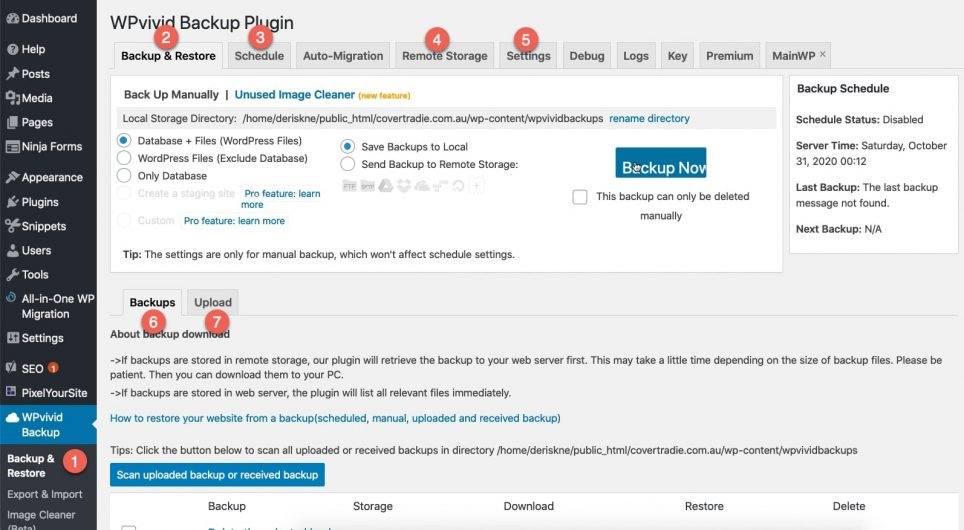
WPvivid Backup Plugin is a free and powerful WordPress backup solution that offers a wide range of features for backing up, restoring, and migrating your site. It allows you to create complete backups of your WordPress site, including files, databases, plugins, and themes, and store them in various cloud storage services like Google Drive, Dropbox, and Amazon S3. WPvivid also includes options for scheduled backups, incremental backups, and one-click restoration, making it a versatile tool for both beginners and advanced users. The plugin is particularly well-suited for users who need a free, reliable backup solution with advanced features like site migration and staging. With its user-friendly interface and robust functionality, WPvivid is a great choice for anyone looking for a comprehensive backup plugin.
- Complete Site Backups: Create full backups of your WordPress site, including files, databases, and plugins.
- Scheduled Backups: Set up automatic backups at regular intervals to keep your data safe.
- Incremental Backups: Backs up only the changes made since the last backup, saving time and storage space.
- Cloud Storage Integration: Store backups in popular cloud services like Google Drive, Dropbox, and Amazon S3.
- One-Click Restoration: Restore your site quickly and easily with just one click.
Frequently Asked Questions
Why do I need a WordPress backup plugin?
A WordPress backup plugin is essential for protecting your website from data loss due to hacking, server crashes, or human error. Without a backup, you risk losing all your content, customer data, and hard work. A backup plugin ensures that you can quickly restore your site to a previous state, minimizing downtime and potential revenue loss. Additionally, backups are crucial for site migrations, updates, and testing new features without risking your live site.
How often should I back up my WordPress site?
The frequency of backups depends on how often your site is updated. For static sites with infrequent changes, weekly backups may be sufficient. However, for dynamic sites like eCommerce stores or blogs with daily updates, daily or even real-time backups are recommended. Real-time backups are ideal for WooCommerce sites, as they capture every transaction and change instantly. Most backup plugins allow you to schedule backups at your preferred intervals, ensuring your data is always protected.
What should I look for in a WordPress backup plugin?
When choosing a WordPress backup plugin, consider the following features: automated backups, cloud storage integration, easy restoration options, incremental backups, and security scanning. Automated backups ensure your site is backed up regularly without manual intervention. Cloud storage integration allows you to store backups off-site, reducing the risk of data loss. Easy restoration options enable you to recover your site quickly in case of an emergency. Incremental backups save time and storage space by only backing up changes since the last backup. Security scanning helps detect and remove malware, keeping your site safe.
Are free WordPress backup plugins reliable?
Free WordPress backup plugins can be reliable, but they often come with limitations compared to premium versions. Free plugins typically offer basic backup and restoration features, while premium plugins include advanced functionalities like real-time backups, incremental backups, and priority support. If you have a small site with minimal updates, a free plugin may suffice. However, for larger sites or eCommerce stores, investing in a premium backup plugin is recommended to ensure comprehensive protection and peace of mind.
Can I use a backup plugin to migrate my WordPress site?
Yes, many WordPress backup plugins also offer site migration features. Plugins like Duplicator, All-in-One WP Migration, and BackupBuddy allow you to create a complete backup of your site and migrate it to a new host or domain with ease. These plugins simplify the migration process by handling all the technical aspects, such as database transfers and file updates. Some plugins even offer one-click migration, making the process seamless and hassle-free. If you plan to migrate your site, choose a backup plugin with built-in migration capabilities.
What is the difference between full backups and incremental backups?
A full backup creates a complete copy of your entire WordPress site, including files, databases, plugins, and themes. This type of backup is comprehensive but can be time-consuming and storage-intensive, especially for large sites. Incremental backups, on the other hand, only back up the changes made since the last backup. This approach saves time and storage space, as it doesn’t duplicate unchanged files. Incremental backups are ideal for sites with frequent updates, as they ensure your data is always protected without overwhelming your server or storage.
How do I restore my WordPress site from a backup?
Restoring your WordPress site from a backup is typically a straightforward process, depending on the plugin you’re using. Most backup plugins offer one-click restoration options, allowing you to recover your site with minimal effort. Here’s a general step-by-step process: 1) Access your backup plugin’s dashboard. 2) Locate the backup file you want to restore. 3) Select the option to restore your site. 4) Follow the on-screen instructions to complete the restoration. Some plugins may require you to upload the backup file manually, while others store backups in the cloud for easy access. Always ensure you have a recent backup before making significant changes to your site.


