
best directory plugin wordpress


If you need to add a directory to your WordPress site, the right plugin can save you hours of work. A good directory plugin should handle listings, search functionality, and user submissions without requiring custom coding. The best options balance ease of use with flexibility, letting you create anything from a simple business directory to a complex membership-based listing system.
Not all directory plugins are built the same. Some focus on design, others on monetization, and a few prioritize performance. The key is finding one that fits your specific needs—whether that’s front-end submission forms, payment integrations, or advanced filtering. Below, I’ve put together a straightforward list of the best directory plugins for WordPress, so you can pick the one that works for your project.
📋 Table of Contents
1. GeoDirectory

GeoDirectory is one of the most powerful and flexible directory plugins for WordPress, designed to help you create any type of directory website with ease. Whether you’re building a local business directory, a global listings site, or a niche-specific platform, GeoDirectory offers a robust set of tools to manage listings, categories, and user submissions. It’s particularly well-suited for users who need advanced location-based features, such as maps, proximity search, and multi-location support. The plugin is highly customizable, allowing you to tailor the design and functionality to match your brand. It also integrates seamlessly with popular page builders like Elementor and Divi, making it a great choice for both beginners and experienced developers. With its scalable architecture, GeoDirectory can handle directories of any size, from small community listings to large, enterprise-level platforms.
- Location-Based Search: GeoDirectory excels in location-based functionality, allowing users to search for listings by proximity, city, or region. It integrates with Google Maps and OpenStreetMap for accurate geolocation.
- Custom Fields and Taxonomies: You can create unlimited custom fields and taxonomies to categorize and filter listings. This flexibility makes it ideal for niche directories like real estate, restaurants, or job boards.
- User Submissions and Reviews: The plugin supports front-end user submissions, allowing visitors to add their own listings. It also includes a review and rating system to build trust and engagement.
- Multi-Language and Multi-Currency Support: GeoDirectory is translation-ready and supports multi-currency pricing, making it perfect for international directories.
- Premium Add-ons: Enhance functionality with premium add-ons like events, bookings, memberships, and advanced search filters. These add-ons allow you to monetize your directory effectively.
2. Business Directory Plugin
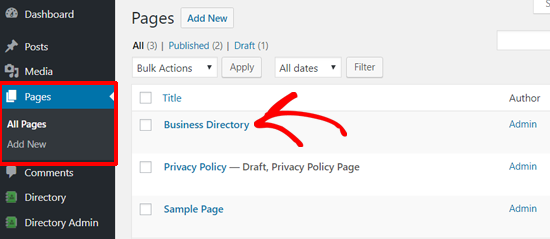
Business Directory Plugin is a user-friendly and feature-rich solution for creating professional directory websites on WordPress. It’s designed to be simple enough for beginners while offering advanced features for power users. The plugin supports all types of directories, from local business listings to classified ads and member directories. One of its standout features is the ability to accept payments for listings, making it easy to monetize your site. The plugin also includes a robust search and filtering system, allowing users to find listings quickly. With its responsive design, your directory will look great on any device. Business Directory Plugin is also highly extensible, with a range of premium modules available to add functionality like reviews, images, and maps.
- Easy Setup and Management: The plugin offers a straightforward setup process with an intuitive dashboard for managing listings, categories, and user submissions.
- Monetization Options: You can charge for listings using PayPal, Stripe, or Authorize.net. The plugin supports recurring payments and featured listings for additional revenue streams.
- Customizable Listing Fields: Create custom fields to capture specific information about listings, such as contact details, business hours, or social media links.
- Responsive Design: All directory pages are fully responsive, ensuring a seamless experience for users on mobile devices, tablets, and desktops.
- Premium Modules: Extend functionality with modules for Google Maps integration, ratings and reviews, image uploads, and more. These modules are available as one-time purchases.
3. Directorist
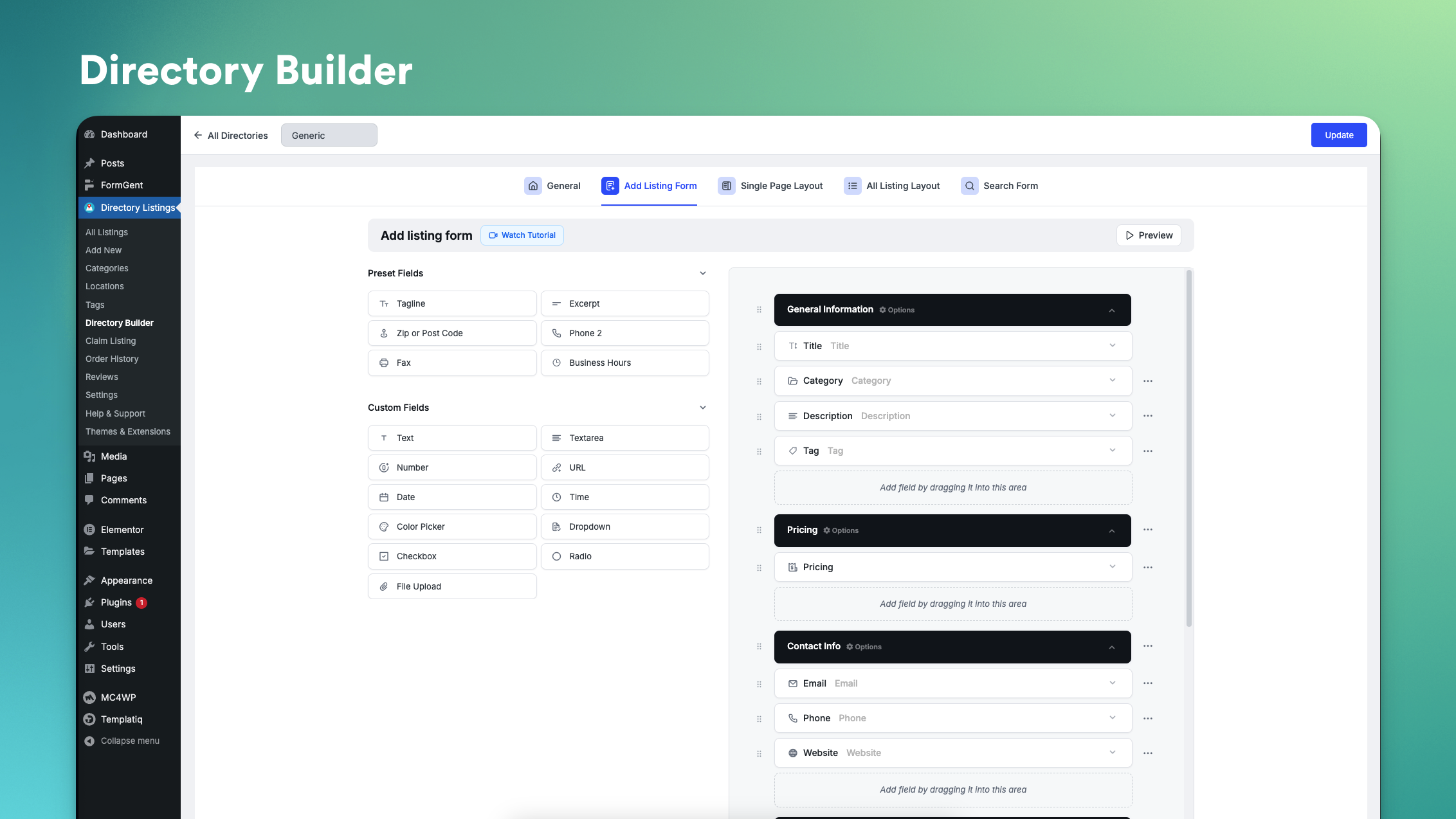
Directorist is a modern and versatile WordPress directory plugin that combines ease of use with powerful features. It’s perfect for creating any type of directory, from business listings to classified ads and community directories. Directorist stands out for its sleek, user-friendly interface and deep integration with Elementor, allowing you to design custom directory pages without coding. The plugin includes advanced search and filtering options, making it easy for users to find what they’re looking for. It also supports monetization through paid listings, memberships, and advertisements. Directorist is highly customizable, with options to tweak every aspect of your directory’s appearance and functionality. Whether you’re a beginner or an experienced developer, Directorist offers the tools you need to build a professional directory website.
- Elementor Integration: Directorist works seamlessly with Elementor, allowing you to design custom directory pages using a drag-and-drop interface.
- Advanced Search and Filtering: Users can search listings by keywords, categories, locations, and custom fields. The plugin also supports AJAX-powered live search for a smoother experience.
- Monetization Features: Monetize your directory with paid listings, featured listings, and membership plans. The plugin supports PayPal, Stripe, and other payment gateways.
- Customizable Listing Pages: Each listing can include images, videos, maps, contact forms, and social media links. You can also enable user reviews and ratings.
- Multi-Language Support: Directorist is translation-ready and supports multi-language directories, making it ideal for global audiences.
4. Sabai Directory

Sabai Directory is a premium WordPress plugin designed for creating highly interactive and feature-rich directory websites. It’s ideal for users who need a powerful, all-in-one solution for building directories with advanced functionality. Sabai Directory includes features like Google Maps integration, user reviews, and customizable listing fields. One of its standout features is the ability to create multi-level categories and subcategories, making it perfect for large directories with diverse listings. The plugin also supports user-generated content, allowing visitors to submit their own listings and reviews. Sabai Directory is highly customizable, with options to tweak the design, layout, and functionality to suit your needs. It’s a great choice for developers and businesses looking to create a professional directory website with minimal hassle.
- Google Maps Integration: Sabai Directory includes built-in Google Maps support, allowing users to view listings on an interactive map and search by location.
- User Reviews and Ratings: Visitors can leave reviews and ratings for listings, helping to build trust and engagement on your directory site.
- Customizable Listing Fields: Create custom fields to capture specific information about listings, such as contact details, business hours, or special offers.
- Multi-Level Categories: Organize listings into multi-level categories and subcategories, making it easy for users to navigate large directories.
- Responsive Design: The plugin is fully responsive, ensuring your directory looks great on all devices, from desktops to smartphones.
5. Connections Business Directory

Connections Business Directory is a lightweight yet powerful plugin for creating business directories, member directories, or staff directories on WordPress. It’s designed to be simple and intuitive, making it a great choice for beginners and small businesses. Despite its simplicity, Connections offers a range of advanced features, including customizable listing fields, category management, and search functionality. The plugin also supports user submissions, allowing visitors to add their own listings. One of its standout features is the ability to import and export listings in CSV format, making it easy to migrate data from other platforms. Connections is also highly extensible, with a range of premium add-ons available to add functionality like maps, images, and social media integration.
- Easy Import and Export: Connections allows you to import and export listings in CSV format, making it easy to migrate data from other platforms or back up your directory.
- Customizable Listing Fields: Create custom fields to capture specific information about listings, such as contact details, business hours, or social media links.
- Category Management: Organize listings into categories and subcategories, making it easy for users to find what they’re looking for.
- User Submissions: Visitors can submit their own listings from the front end, reducing the need for manual data entry.
- Premium Add-ons: Extend functionality with add-ons for Google Maps integration, image uploads, social media links, and more. These add-ons are available as one-time purchases.
6. Toolset Directory

Toolset Directory is part of the Toolset suite of plugins, which are designed to help you build custom WordPress websites without coding. Toolset Directory is specifically tailored for creating advanced directory websites with custom post types, fields, and taxonomies. It’s ideal for users who need a highly customizable solution for building directories with unique requirements. The plugin includes features like front-end forms for user submissions, advanced search and filtering, and integration with popular page builders like Elementor and Beaver Builder. Toolset Directory is also compatible with WooCommerce, allowing you to monetize your directory through paid listings or memberships. While it has a steeper learning curve than some other plugins, Toolset Directory offers unparalleled flexibility for developers and power users.
- Custom Post Types and Fields: Create custom post types and fields to capture any type of information about your listings, from contact details to special offers.
- Front-End Forms: Allow users to submit listings from the front end of your site, reducing the need for manual data entry and improving user engagement.
- Advanced Search and Filtering: Users can search listings by keywords, categories, locations, and custom fields. The plugin also supports AJAX-powered live search for a smoother experience.
- WooCommerce Integration: Monetize your directory by selling listings, memberships, or other products through WooCommerce. The plugin supports recurring payments and featured listings.
- Page Builder Compatibility: Toolset Directory works seamlessly with popular page builders like Elementor and Beaver Builder, allowing you to design custom directory pages without coding.
7. Listable
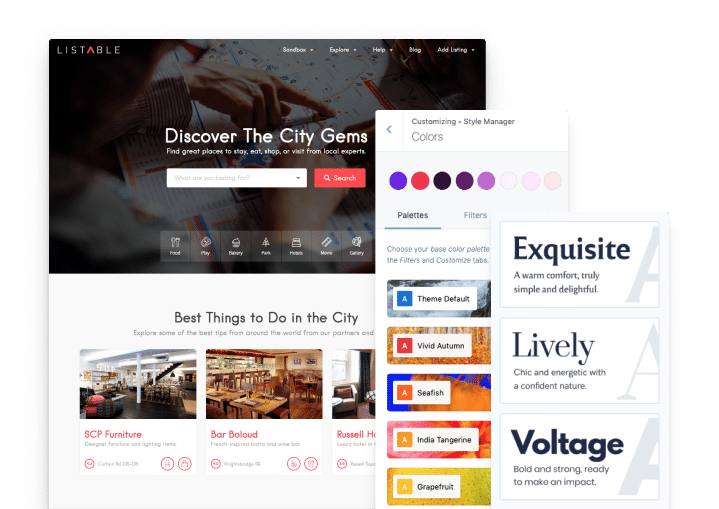
Listable is a premium WordPress theme designed specifically for creating directory and listing websites. While it’s technically a theme rather than a plugin, Listable includes built-in directory functionality that rivals many dedicated plugins. It’s perfect for users who want a beautiful, ready-to-use solution for building a directory website without the need for extensive customization. Listable includes features like Google Maps integration, customizable listing fields, and advanced search and filtering. The theme also supports user submissions, allowing visitors to add their own listings. One of its standout features is its modern, responsive design, which ensures your directory looks great on all devices. Listable is also compatible with popular plugins like WooCommerce, allowing you to monetize your directory through paid listings or memberships.
- Built-In Directory Functionality: Listable includes all the features you need to create a directory website, from customizable listing fields to advanced search and filtering.
- Google Maps Integration: The theme includes built-in Google Maps support, allowing users to view listings on an interactive map and search by location.
- User Submissions: Visitors can submit their own listings from the front end, reducing the need for manual data entry and improving user engagement.
- Responsive Design: Listable is fully responsive, ensuring your directory looks great on all devices, from desktops to smartphones.
- WooCommerce Compatibility: Monetize your directory by selling listings, memberships, or other products through WooCommerce. The theme supports recurring payments and featured listings.
8. WP Job Manager

WP Job Manager is a lightweight yet powerful plugin for creating job listing directories on WordPress. While it’s primarily designed for job boards, it can also be used to create other types of directories, such as business listings or classified ads. The plugin includes features like front-end job submission forms, customizable listing fields, and advanced search and filtering. WP Job Manager is highly extensible, with a range of premium add-ons available to add functionality like maps, images, and social media integration. It’s also compatible with popular page builders like Elementor and Beaver Builder, allowing you to design custom directory pages without coding. Whether you’re building a job board or a general directory, WP Job Manager offers the tools you need to create a professional and user-friendly website.
- Front-End Submission Forms: Allow users to submit listings from the front end of your site, reducing the need for manual data entry and improving user engagement.
- Customizable Listing Fields: Create custom fields to capture specific information about listings, such as job descriptions, contact details, or business hours.
- Advanced Search and Filtering: Users can search listings by keywords, categories, locations, and custom fields. The plugin also supports AJAX-powered live search for a smoother experience.
- Premium Add-ons: Extend functionality with add-ons for Google Maps integration, image uploads, social media links, and more. These add-ons are available as one-time purchases.
- Page Builder Compatibility: WP Job Manager works seamlessly with popular page builders like Elementor and Beaver Builder, allowing you to design custom directory pages without coding.
9. Advanced Classifieds & Directory Pro
Advanced Classifieds & Directory Pro is a versatile WordPress plugin designed for creating classified ads and directory websites. It’s ideal for users who need a flexible solution for building directories with advanced features like paid listings, user submissions, and customizable fields. The plugin includes a range of monetization options, allowing you to charge for listings, featured placements, or memberships. It also supports Google Maps integration, making it easy for users to search for listings by location. Advanced Classifieds & Directory Pro is highly customizable, with options to tweak the design, layout, and functionality to suit your needs. Whether you’re building a local business directory or a global classifieds site, this plugin offers the tools you need to create a professional and user-friendly website.
- Monetization Options: Charge for listings, featured placements, or memberships using PayPal, Stripe, or other payment gateways. The plugin supports recurring payments and one-time fees.
- User Submissions: Visitors can submit their own listings from the front end, reducing the need for manual data entry and improving user engagement.
- Google Maps Integration: The plugin includes built-in Google Maps support, allowing users to view listings on an interactive map and search by location.
- Customizable Listing Fields: Create custom fields to capture specific information about listings, such as contact details, business hours, or special offers.
- Responsive Design: All directory pages are fully responsive, ensuring a seamless experience for users on mobile devices, tablets, and desktops.
10. HivePress

HivePress is a modern and flexible WordPress plugin for creating directory and classifieds websites. It’s designed to be lightweight yet powerful, offering a range of features to help you build a professional directory with ease. HivePress includes features like customizable listing fields, advanced search and filtering, and user submissions. One of its standout features is its deep integration with WooCommerce, allowing you to monetize your directory through paid listings, memberships, or other products. The plugin also supports Google Maps integration, making it easy for users to search for listings by location. HivePress is highly customizable, with options to tweak the design, layout, and functionality to suit your needs. Whether you’re building a local business directory or a global classifieds site, HivePress offers the tools you need to create a user-friendly and profitable website.
- WooCommerce Integration: Monetize your directory by selling listings, memberships, or other products through WooCommerce. The plugin supports recurring payments and featured listings.
- Customizable Listing Fields: Create custom fields to capture specific information about listings, such as contact details, business hours, or special offers.
- Advanced Search and Filtering: Users can search listings by keywords, categories, locations, and custom fields. The plugin also supports AJAX-powered live search for a smoother experience.
- User Submissions: Visitors can submit their own listings from the front end, reducing the need for manual data entry and improving user engagement.
- Google Maps Integration: The plugin includes built-in Google Maps support, allowing users to view listings on an interactive map and search by location.
Frequently Asked Questions
What is a WordPress directory plugin?
A WordPress directory plugin is a tool that allows you to create and manage a directory website on your WordPress site. These plugins provide features like customizable listing fields, search and filtering options, user submissions, and monetization tools. They are ideal for building websites like business directories, job boards, classified ads, or community listings. Directory plugins can range from simple solutions for small directories to advanced tools for large, enterprise-level platforms.
How do I choose the best directory plugin for my WordPress site?
Choosing the best directory plugin depends on your specific needs and goals. Here are some factors to consider: 1) Type of directory: Are you building a business directory, job board, or classifieds site? Some plugins are better suited for specific types of directories. 2) Features: Look for plugins that offer the features you need, such as customizable fields, search and filtering, user submissions, and monetization options. 3) Ease of use: If you’re a beginner, choose a plugin with a user-friendly interface and good documentation. 4) Customization: If you need a highly customizable solution, look for plugins that offer advanced design and functionality options. 5) Budget: Consider your budget and whether the plugin offers a free version or premium add-ons. 6) Support and updates: Choose a plugin with active development and good customer support to ensure it stays up-to-date and secure.
Can I monetize my directory website with these plugins?
Yes, most directory plugins offer monetization features that allow you to generate revenue from your website. Common monetization options include: 1) Paid listings: Charge users to submit or feature their listings. 2) Memberships: Offer premium membership plans that provide additional benefits, such as increased visibility or access to exclusive listings. 3) Advertisements: Sell ad space on your directory pages. 4) Affiliate marketing: Promote products or services related to your directory and earn commissions on sales. 5) Sponsored content: Allow businesses to pay for sponsored listings or articles. Many plugins integrate with popular payment gateways like PayPal, Stripe, and Authorize.net to facilitate these monetization options.
Do these plugins support user submissions?
Yes, most directory plugins support user submissions, allowing visitors to add their own listings to your directory. This feature is particularly useful for building community-driven directories or classifieds sites. User submissions typically include front-end forms where visitors can enter details about their listings, such as contact information, descriptions, and images. Some plugins also offer moderation tools to review and approve submissions before they go live. This helps maintain the quality and accuracy of your directory while reducing the need for manual data entry.
Are these plugins compatible with page builders like Elementor?
Many directory plugins are compatible with popular page builders like Elementor, Beaver Builder, and Divi. This compatibility allows you to design custom directory pages using a drag-and-drop interface, making it easier to create a unique and professional-looking website without coding. Plugins like Directorist, Toolset Directory, and WP Job Manager offer deep integration with page builders, providing pre-built templates and widgets to streamline the design process. If you’re using a page builder, be sure to check the plugin’s documentation or website to confirm compatibility before making a purchase.
Can I use these plugins to create a multi-language directory?
Yes, many directory plugins support multi-language functionality, allowing you to create a directory website that caters to a global audience. Plugins like GeoDirectory, Directorist, and HivePress are translation-ready and compatible with popular multi-language plugins like WPML and Polylang. This means you can translate your directory’s content, including listings, categories, and search filters, into multiple languages. Some plugins also offer built-in multi-language support, making it easier to create a seamless experience for users in different regions.
What are the key features to look for in a directory plugin?
When choosing a directory plugin, look for the following key features to ensure it meets your needs: 1) Customizable listing fields: The ability to create custom fields to capture specific information about listings. 2) Advanced search and filtering: Tools to help users find listings quickly and easily. 3) User submissions: Front-end forms that allow visitors to add their own listings. 4) Monetization options: Features like paid listings, memberships, and advertisements to generate revenue. 5) Google Maps integration: The ability to display listings on an interactive map and search by location. 6) Responsive design: A mobile-friendly layout that ensures your directory looks great on all devices. 7) Multi-language support: The ability to translate your directory into multiple languages. 8) Compatibility with page builders: Integration with tools like Elementor or Beaver Builder for easy customization. 9) Premium add-ons: Additional features and extensions to enhance functionality. 10) Good documentation and support: Access to tutorials, guides, and customer support to help you get the most out of the plugin.


