
best wordpress blog layouts


When setting up a WordPress blog, the layout you choose can make or break reader engagement. A clean, well-organized design keeps visitors on the page longer, improves readability, and makes navigation intuitive. The best layouts balance aesthetics with functionality, ensuring your content stands out without overwhelming the user. Whether you’re running a personal blog, a business site, or a niche publication, the right structure helps convey your message clearly and keeps people coming back.
The most effective WordPress blog layouts prioritize simplicity, fast load times, and mobile responsiveness. Cluttered sidebars, excessive widgets, or poorly spaced text can distract from your content and increase bounce rates. Instead, focus on layouts that highlight your posts, use whitespace effectively, and guide the reader’s eye naturally through the page. A strong layout also adapts to different screen sizes, since more than half of web traffic now comes from mobile devices.
Different blogs have different needs, so the best layout for you depends on your goals. Some designs work better for long-form content, while others suit visual-heavy blogs or those with frequent updates. Below, I’ve assembled a list of the best WordPress blog layouts to consider, based on performance, flexibility, and user experience.
📋 Table of Contents
1. Astra Theme

Astra is one of the most popular WordPress themes, known for its lightweight design and high performance. It’s a versatile theme that works exceptionally well for blogs, offering a range of pre-built starter templates that can be customized to fit any niche. Astra is designed to be fast, SEO-friendly, and compatible with popular page builders like Elementor and Beaver Builder. Whether you’re a beginner or an experienced blogger, Astra provides the flexibility to create a unique and engaging blog layout without touching a line of code. Its modular approach allows you to enable or disable features, ensuring your site remains optimized for speed and user experience.
- Pre-Built Starter Templates: Astra offers over 200+ pre-built starter templates, including several blog-specific layouts. These templates are designed to be imported with a single click, saving you time and effort in setting up your blog.
- Lightweight and Fast: Astra is built for speed, with a file size of less than 50KB. This ensures your blog loads quickly, improving user experience and SEO rankings.
- Customization Without Code: The theme integrates seamlessly with popular page builders like Elementor, Beaver Builder, and Brizy, allowing you to customize your blog layout with drag-and-drop ease.
- SEO-Friendly: Astra is built with clean code and follows best SEO practices, helping your blog rank higher in search engine results.
- WooCommerce Integration: If you plan to monetize your blog with an online store, Astra offers deep WooCommerce integration, making it easy to set up and customize your shop.
2. Divi Theme
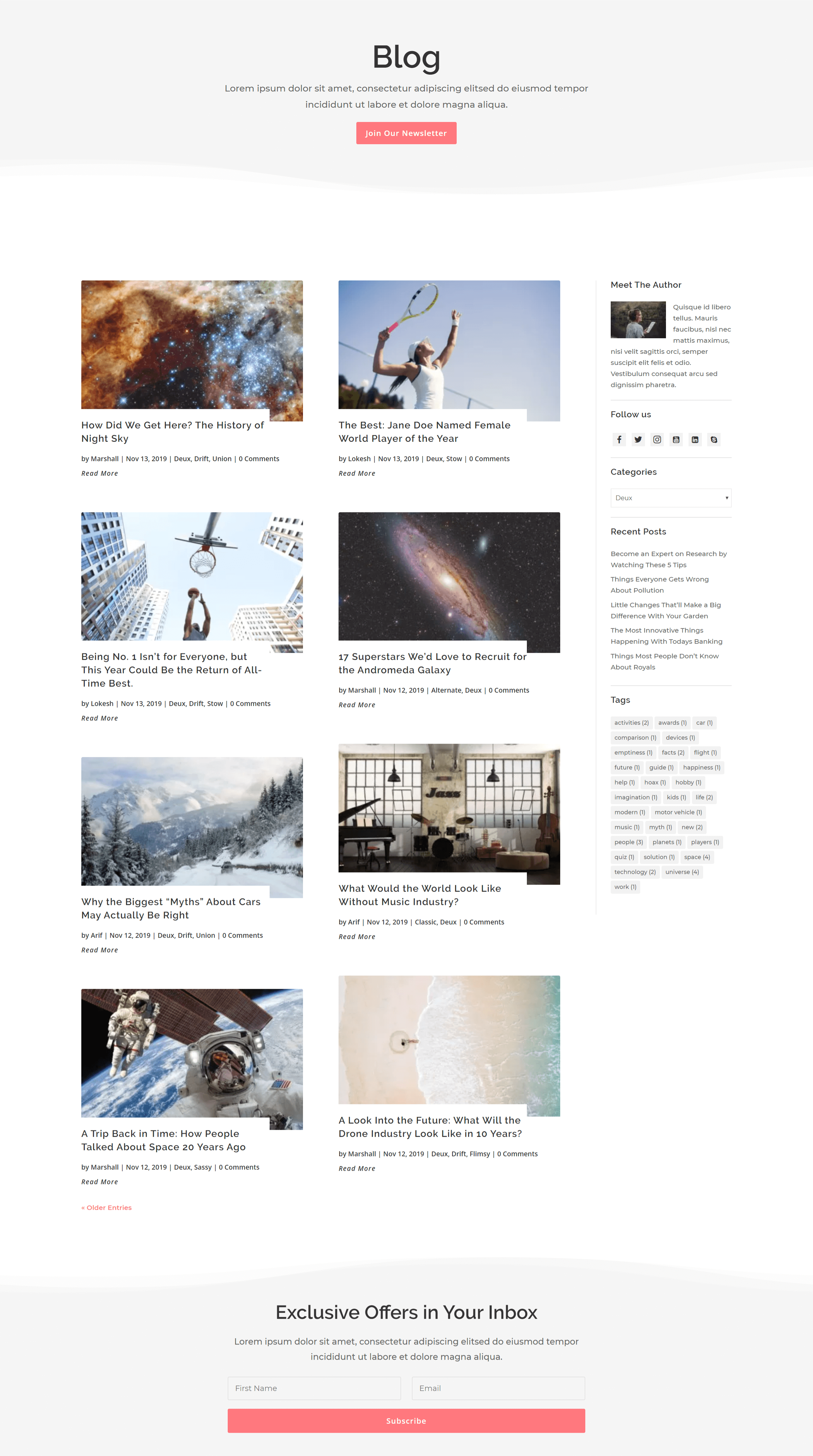
Divi is a powerful and flexible WordPress theme that comes with its own built-in page builder, the Divi Builder. This makes it an excellent choice for bloggers who want complete control over their blog’s design without needing to hire a developer. Divi offers a wide range of pre-made layouts, including several blog-specific designs that can be customized to match your brand. The theme is highly responsive, ensuring your blog looks great on all devices. Divi also includes advanced features like split testing, dynamic content, and global elements, making it a favorite among professional bloggers and marketers.
- Divi Builder: Divi comes with its own drag-and-drop page builder, allowing you to create custom blog layouts without any coding knowledge. The builder includes a wide range of modules and design options.
- Pre-Made Blog Layouts: Divi offers a library of pre-made blog layouts that can be imported and customized to fit your needs. These layouts are designed to be visually appealing and functional.
- Responsive Design: Divi ensures your blog looks great on all devices, from desktops to smartphones. You can also customize the responsive settings to fine-tune the appearance on different screen sizes.
- Split Testing: Divi includes built-in split testing, allowing you to test different blog layouts and designs to see which performs best with your audience.
- Global Elements: With Divi, you can create global elements like headers, footers, and sidebars that can be reused across your blog, ensuring consistency and saving time.
3. GeneratePress

GeneratePress is a lightweight and highly customizable WordPress theme that’s perfect for bloggers who prioritize speed and performance. The theme is built with a focus on simplicity and efficiency, making it one of the fastest themes available. GeneratePress offers a range of blog-specific layouts and integrates seamlessly with popular page builders like Elementor and Beaver Builder. The theme is also fully responsive, ensuring your blog looks great on all devices. With its modular approach, you can enable or disable features to keep your site lean and fast. GeneratePress is an excellent choice for bloggers who want a clean, minimalist design without sacrificing functionality.
- Lightweight and Fast: GeneratePress is built for speed, with a file size of less than 30KB. This ensures your blog loads quickly, improving user experience and SEO rankings.
- Modular Design: The theme allows you to enable or disable features as needed, ensuring your site remains optimized for performance.
- Customizable Blog Layouts: GeneratePress offers a range of blog-specific layouts that can be customized to fit your brand. You can adjust the layout, typography, colors, and more without touching a line of code.
- Page Builder Compatibility: The theme integrates seamlessly with popular page builders like Elementor and Beaver Builder, allowing you to create custom blog layouts with ease.
- Responsive and Mobile-Friendly: GeneratePress ensures your blog looks great on all devices, with customizable responsive settings to fine-tune the appearance on different screen sizes.
4. OceanWP

OceanWP is a versatile and feature-rich WordPress theme that’s perfect for bloggers who want a highly customizable and responsive design. The theme offers a range of pre-built demo sites, including several blog-specific layouts that can be imported with a single click. OceanWP is compatible with popular page builders like Elementor and Beaver Builder, allowing you to create custom blog layouts without any coding knowledge. The theme is also fully responsive, ensuring your blog looks great on all devices. OceanWP includes advanced features like WooCommerce integration, custom widgets, and a range of typography and color options, making it a great choice for bloggers who want a professional and engaging blog layout.
- Pre-Built Demo Sites: OceanWP offers a library of pre-built demo sites, including several blog-specific layouts that can be imported with a single click. These demos are designed to be visually appealing and functional.
- Page Builder Compatibility: The theme integrates seamlessly with popular page builders like Elementor and Beaver Builder, allowing you to create custom blog layouts with drag-and-drop ease.
- WooCommerce Integration: OceanWP offers deep WooCommerce integration, making it easy to set up and customize an online store to monetize your blog.
- Custom Widgets: The theme includes a range of custom widgets, such as social media widgets, recent posts widgets, and more, allowing you to enhance your blog’s functionality.
- Responsive Design: OceanWP ensures your blog looks great on all devices, with customizable responsive settings to fine-tune the appearance on different screen sizes.
5. Neve
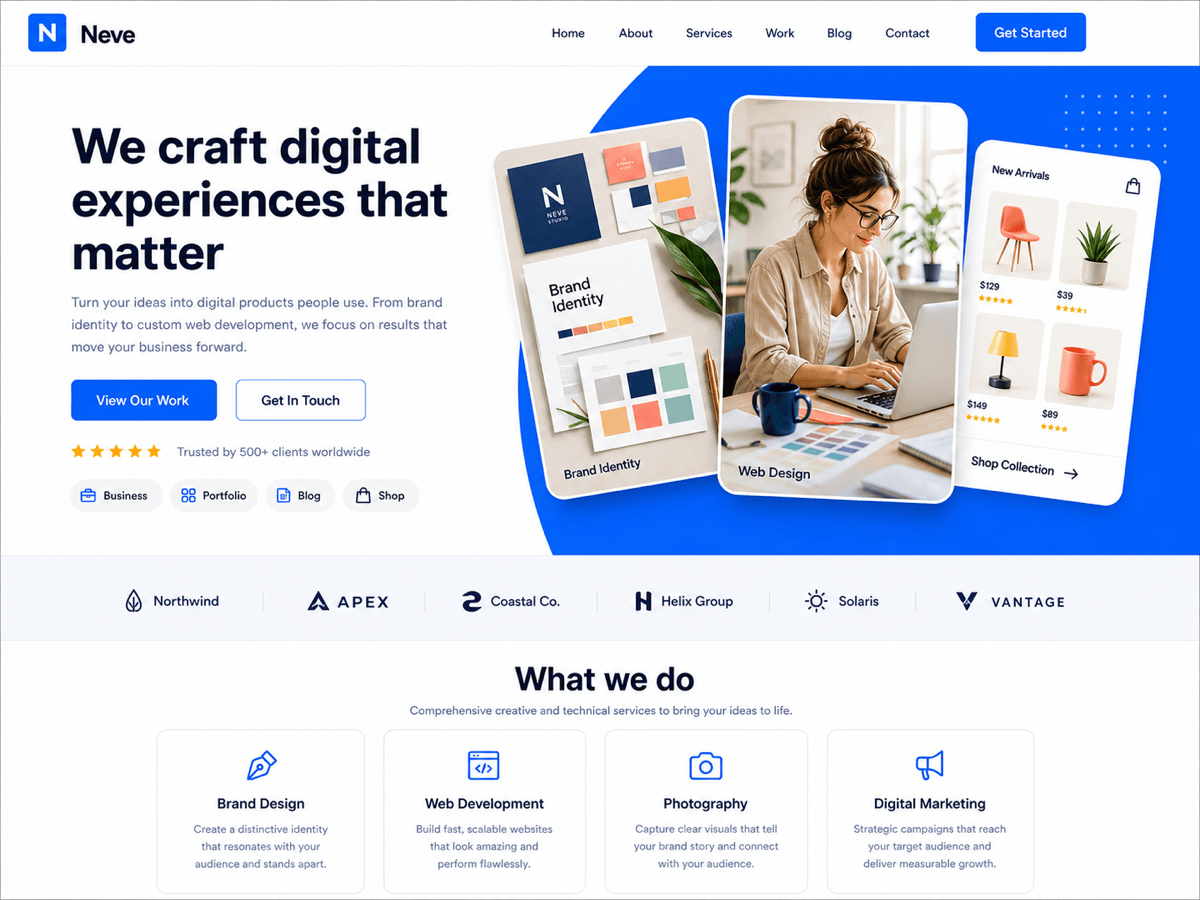
Neve is a lightweight and highly customizable WordPress theme that’s perfect for bloggers who want a fast and responsive design. The theme offers a range of pre-built starter sites, including several blog-specific layouts that can be imported with a single click. Neve is compatible with popular page builders like Elementor and Beaver Builder, allowing you to create custom blog layouts without any coding knowledge. The theme is also fully responsive, ensuring your blog looks great on all devices. Neve includes advanced features like AMP compatibility, custom header and footer layouts, and a range of typography and color options, making it a great choice for bloggers who want a modern and engaging blog layout.
- Pre-Built Starter Sites: Neve offers a library of pre-built starter sites, including several blog-specific layouts that can be imported with a single click. These starter sites are designed to be visually appealing and functional.
- Page Builder Compatibility: The theme integrates seamlessly with popular page builders like Elementor and Beaver Builder, allowing you to create custom blog layouts with drag-and-drop ease.
- AMP Compatibility: Neve is fully compatible with AMP (Accelerated Mobile Pages), ensuring your blog loads quickly on mobile devices and improves SEO rankings.
- Custom Header and Footer Layouts: The theme allows you to create custom header and footer layouts, giving you full control over the appearance of your blog’s navigation and branding.
- Responsive Design: Neve ensures your blog looks great on all devices, with customizable responsive settings to fine-tune the appearance on different screen sizes.
6. Kadence Theme
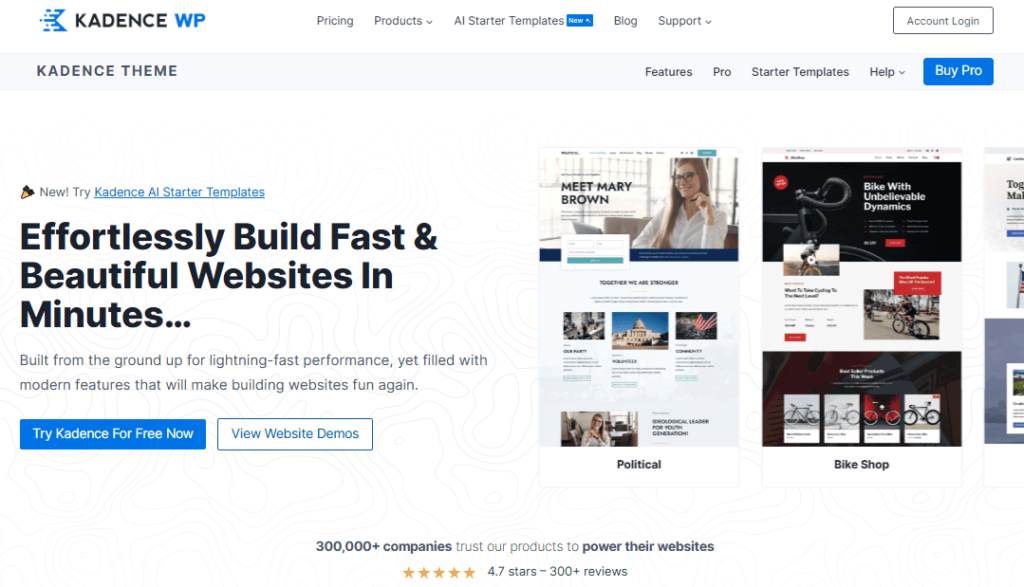
Kadence is a modern and highly customizable WordPress theme that’s perfect for bloggers who want a fast and responsive design. The theme offers a range of pre-built starter templates, including several blog-specific layouts that can be imported with a single click. Kadence is compatible with popular page builders like Elementor and Beaver Builder, allowing you to create custom blog layouts without any coding knowledge. The theme is also fully responsive, ensuring your blog looks great on all devices. Kadence includes advanced features like custom header and footer layouts, global typography and color settings, and a range of custom widgets, making it a great choice for bloggers who want a professional and engaging blog layout.
- Pre-Built Starter Templates: Kadence offers a library of pre-built starter templates, including several blog-specific layouts that can be imported with a single click. These templates are designed to be visually appealing and functional.
- Page Builder Compatibility: The theme integrates seamlessly with popular page builders like Elementor and Beaver Builder, allowing you to create custom blog layouts with drag-and-drop ease.
- Custom Header and Footer Layouts: Kadence allows you to create custom header and footer layouts, giving you full control over the appearance of your blog’s navigation and branding.
- Global Typography and Color Settings: The theme includes global typography and color settings, allowing you to maintain a consistent design across your entire blog.
- Responsive Design: Kadence ensures your blog looks great on all devices, with customizable responsive settings to fine-tune the appearance on different screen sizes.
7. Hestia

Hestia is a modern and stylish WordPress theme that’s perfect for bloggers who want a clean and professional design. The theme offers a range of pre-built starter sites, including several blog-specific layouts that can be imported with a single click. Hestia is compatible with popular page builders like Elementor and Beaver Builder, allowing you to create custom blog layouts without any coding knowledge. The theme is also fully responsive, ensuring your blog looks great on all devices. Hestia includes advanced features like WooCommerce integration, custom header and footer layouts, and a range of typography and color options, making it a great choice for bloggers who want a visually appealing and functional blog layout.
- Pre-Built Starter Sites: Hestia offers a library of pre-built starter sites, including several blog-specific layouts that can be imported with a single click. These starter sites are designed to be visually appealing and functional.
- Page Builder Compatibility: The theme integrates seamlessly with popular page builders like Elementor and Beaver Builder, allowing you to create custom blog layouts with drag-and-drop ease.
- WooCommerce Integration: Hestia offers deep WooCommerce integration, making it easy to set up and customize an online store to monetize your blog.
- Custom Header and Footer Layouts: The theme allows you to create custom header and footer layouts, giving you full control over the appearance of your blog’s navigation and branding.
- Responsive Design: Hestia ensures your blog looks great on all devices, with customizable responsive settings to fine-tune the appearance on different screen sizes.
8. Blocksy
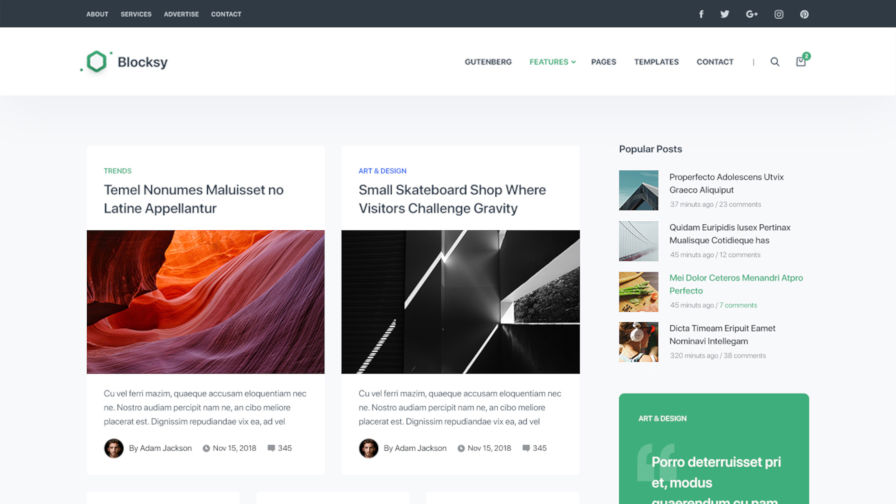
Blocksy is a modern and highly customizable WordPress theme that’s perfect for bloggers who want a fast and responsive design. The theme offers a range of pre-built starter sites, including several blog-specific layouts that can be imported with a single click. Blocksy is compatible with popular page builders like Elementor and Beaver Builder, allowing you to create custom blog layouts without any coding knowledge. The theme is also fully responsive, ensuring your blog looks great on all devices. Blocksy includes advanced features like custom header and footer layouts, global typography and color settings, and a range of custom widgets, making it a great choice for bloggers who want a professional and engaging blog layout.
- Pre-Built Starter Sites: Blocksy offers a library of pre-built starter sites, including several blog-specific layouts that can be imported with a single click. These starter sites are designed to be visually appealing and functional.
- Page Builder Compatibility: The theme integrates seamlessly with popular page builders like Elementor and Beaver Builder, allowing you to create custom blog layouts with drag-and-drop ease.
- Custom Header and Footer Layouts: Blocksy allows you to create custom header and footer layouts, giving you full control over the appearance of your blog’s navigation and branding.
- Global Typography and Color Settings: The theme includes global typography and color settings, allowing you to maintain a consistent design across your entire blog.
- Responsive Design: Blocksy ensures your blog looks great on all devices, with customizable responsive settings to fine-tune the appearance on different screen sizes.
9. Zakra

Zakra is a lightweight and highly customizable WordPress theme that’s perfect for bloggers who want a fast and responsive design. The theme offers a range of pre-built starter sites, including several blog-specific layouts that can be imported with a single click. Zakra is compatible with popular page builders like Elementor and Beaver Builder, allowing you to create custom blog layouts without any coding knowledge. The theme is also fully responsive, ensuring your blog looks great on all devices. Zakra includes advanced features like WooCommerce integration, custom header and footer layouts, and a range of typography and color options, making it a great choice for bloggers who want a professional and engaging blog layout.
- Pre-Built Starter Sites: Zakra offers a library of pre-built starter sites, including several blog-specific layouts that can be imported with a single click. These starter sites are designed to be visually appealing and functional.
- Page Builder Compatibility: The theme integrates seamlessly with popular page builders like Elementor and Beaver Builder, allowing you to create custom blog layouts with drag-and-drop ease.
- WooCommerce Integration: Zakra offers deep WooCommerce integration, making it easy to set up and customize an online store to monetize your blog.
- Custom Header and Footer Layouts: The theme allows you to create custom header and footer layouts, giving you full control over the appearance of your blog’s navigation and branding.
- Responsive Design: Zakra ensures your blog looks great on all devices, with customizable responsive settings to fine-tune the appearance on different screen sizes.
10. Colormag

Colormag is a vibrant and feature-rich WordPress theme that’s perfect for bloggers who want a visually appealing and engaging design. The theme offers a range of pre-built demo sites, including several blog-specific layouts that can be imported with a single click. Colormag is compatible with popular page builders like Elementor and Beaver Builder, allowing you to create custom blog layouts without any coding knowledge. The theme is also fully responsive, ensuring your blog looks great on all devices. Colormag includes advanced features like custom widgets, multiple header and footer layouts, and a range of typography and color options, making it a great choice for bloggers who want a dynamic and interactive blog layout.
- Pre-Built Demo Sites: Colormag offers a library of pre-built demo sites, including several blog-specific layouts that can be imported with a single click. These demos are designed to be visually appealing and functional.
- Page Builder Compatibility: The theme integrates seamlessly with popular page builders like Elementor and Beaver Builder, allowing you to create custom blog layouts with drag-and-drop ease.
- Custom Widgets: Colormag includes a range of custom widgets, such as social media widgets, recent posts widgets, and more, allowing you to enhance your blog’s functionality.
- Multiple Header and Footer Layouts: The theme offers multiple header and footer layouts, giving you full control over the appearance of your blog’s navigation and branding.
- Responsive Design: Colormag ensures your blog looks great on all devices, with customizable responsive settings to fine-tune the appearance on different screen sizes.
Frequently Asked Questions
What is the best WordPress blog layout for beginners?
For beginners, the best WordPress blog layouts are those that are easy to set up and customize without requiring any coding knowledge. Themes like Astra, GeneratePress, and Neve are excellent choices because they offer pre-built starter templates that can be imported with a single click. These themes also integrate seamlessly with popular page builders like Elementor and Beaver Builder, allowing you to customize your blog layout with drag-and-drop ease. Additionally, these themes are lightweight and fast, ensuring your blog loads quickly and provides a great user experience.
How do I choose the right WordPress theme for my blog?
Choosing the right WordPress theme for your blog depends on several factors, including your niche, design preferences, and technical skills. Here are some key considerations to keep in mind: 1) Purpose: Determine the primary goal of your blog (e.g., personal blogging, business, e-commerce). 2) Design: Look for a theme that matches your aesthetic preferences and offers customization options. 3) Performance: Choose a lightweight and fast theme to ensure your blog loads quickly. 4) Responsiveness: Ensure the theme is fully responsive and looks great on all devices. 5) Compatibility: Check if the theme is compatible with popular page builders and plugins. 6) Support: Look for a theme with good documentation and customer support. By considering these factors, you can choose a theme that meets your needs and helps you create a successful blog.
Can I customize my WordPress blog layout without coding?
Yes, you can customize your WordPress blog layout without coding by using a theme that integrates with popular page builders like Elementor, Beaver Builder, or Divi Builder. These page builders offer drag-and-drop functionality, allowing you to create custom blog layouts with ease. Many themes, such as Astra, GeneratePress, and OceanWP, are designed to work seamlessly with these page builders, providing you with a wide range of customization options. Additionally, these themes often include pre-built starter templates that can be imported and customized to fit your brand, making it easy to create a professional and engaging blog layout without any coding knowledge.
What are the key features to look for in a WordPress blog theme?
When choosing a WordPress blog theme, there are several key features to look for to ensure you create a successful and engaging blog. These features include: 1) Pre-Built Templates: Look for a theme that offers pre-built blog-specific layouts that can be imported with a single click. 2) Page Builder Compatibility: Ensure the theme integrates seamlessly with popular page builders like Elementor or Beaver Builder. 3) Responsiveness: Choose a theme that is fully responsive and looks great on all devices. 4) Performance: Opt for a lightweight and fast theme to ensure your blog loads quickly. 5) Customization Options: Look for a theme that offers a range of customization options, such as typography, color settings, and custom widgets. 6) SEO-Friendliness: Choose a theme that is built with clean code and follows best SEO practices. 7) Support and Documentation: Ensure the theme comes with good documentation and customer support. By considering these features, you can choose a theme that meets your needs and helps you create a successful blog.
How can I improve the loading speed of my WordPress blog?
Improving the loading speed of your WordPress blog is crucial for providing a great user experience and improving your SEO rankings. Here are some practical tips to help you optimize your blog’s performance: 1) Choose a Lightweight Theme: Opt for a lightweight and fast theme like Astra, GeneratePress, or Neve. 2) Use a Caching Plugin: Install a caching plugin like WP Rocket, W3 Total Cache, or WP Super Cache to reduce load times. 3) Optimize Images: Use an image optimization plugin like Smush or ShortPixel to compress and optimize your images. 4) Minify CSS and JavaScript: Use a plugin like Autoptimize to minify and combine your CSS and JavaScript files. 5) Use a Content Delivery Network (CDN): A CDN like Cloudflare or MaxCDN can help distribute your content globally, reducing load times for visitors from different locations. 6) Enable Lazy Loading: Use a plugin like Lazy Load by WP Rocket to delay the loading of images and videos until they are needed. 7) Reduce Plugin Usage: Limit the number of plugins you use, as too many plugins can slow down your blog. By implementing these tips, you can significantly improve the loading speed of your WordPress blog.
What is the difference between a free and premium WordPress theme?
The main difference between free and premium WordPress themes lies in the features, support, and customization options they offer. Free themes are a great starting point for beginners and those on a tight budget. They often include basic customization options and are generally lightweight and fast. However, free themes may lack advanced features, such as pre-built templates, custom widgets, and premium support. Premium themes, on the other hand, offer a wider range of features, including pre-built demo sites, advanced customization options, and dedicated customer support. They are also more likely to receive regular updates and security patches. While premium themes come with a cost, they provide more flexibility and functionality, making them a worthwhile investment for bloggers who want to create a professional and engaging blog layout.
How do I monetize my WordPress blog?
Monetizing your WordPress blog can be a great way to generate income from your content. Here are some popular methods to monetize your blog: 1) Affiliate Marketing: Promote products or services from other companies and earn a commission for each sale or lead generated through your affiliate links. 2) Display Advertising: Use ad networks like Google AdSense, Mediavine, or AdThrive to display ads on your blog and earn revenue based on impressions or clicks. 3) Sponsored Posts: Partner with brands to create sponsored content that promotes their products or services. 4) Sell Digital Products: Create and sell digital products like e-books, courses, or printables directly from your blog. 5) Offer Services: Use your blog to promote your services, such as consulting, coaching, or freelance writing. 6) Membership or Subscription Model: Create a membership site where users pay a recurring fee to access exclusive content or resources. 7) Donations: Add a donation button to your blog, allowing readers to support your work voluntarily. By implementing these monetization strategies, you can generate income from your WordPress blog and turn it into a profitable venture.


