
best wordpress cache plugin


WordPress cache plugins are essential for improving site speed, reducing server load, and enhancing user experience. A good caching plugin stores static versions of your pages, so they load faster for visitors without requiring the server to process every request from scratch. This is especially important for sites with high traffic or dynamic content, where performance can suffer without proper optimization.
Not all cache plugins are created equal. Some offer basic caching, while others include advanced features like minification, lazy loading, and CDN integration. The right choice depends on your site’s needs, technical comfort level, and whether you’re running a simple blog or a complex e-commerce store. Performance gains can vary, so testing different options is often necessary.
Below, I’ve assembled a list of the best WordPress cache plugins to help you decide which one fits your setup.
📋 Table of Contents
1. WP Rocket

WP Rocket is one of the most popular premium caching plugins for WordPress, known for its user-friendly interface and powerful performance optimization features. Unlike many other caching plugins, WP Rocket works right out of the box with minimal configuration, making it ideal for beginners and non-technical users. It combines multiple performance-boosting techniques, including page caching, browser caching, and GZIP compression, to significantly reduce load times. WP Rocket also integrates seamlessly with popular CDNs like Cloudflare and offers advanced features like lazy loading for images and videos, database optimization, and preloading. Its intuitive dashboard makes it easy to enable or disable features with just a few clicks, ensuring your site runs at peak speed without requiring deep technical knowledge.
- Easy Setup: WP Rocket requires no complex configuration. Simply install and activate the plugin, and it starts working immediately with default settings optimized for most websites.
- Page Caching: Creates static HTML files of your dynamic WordPress pages, reducing server load and improving response times for visitors.
- Lazy Loading: Delays the loading of images, iframes, and videos until they are visible on the screen, reducing initial page load time.
- Database Optimization: Cleans up unnecessary data like post revisions, spam comments, and transients to keep your database lean and efficient.
- CDN Integration: Supports integration with popular CDNs like Cloudflare, BunnyCDN, and others to further speed up content delivery globally.
2. W3 Total Cache
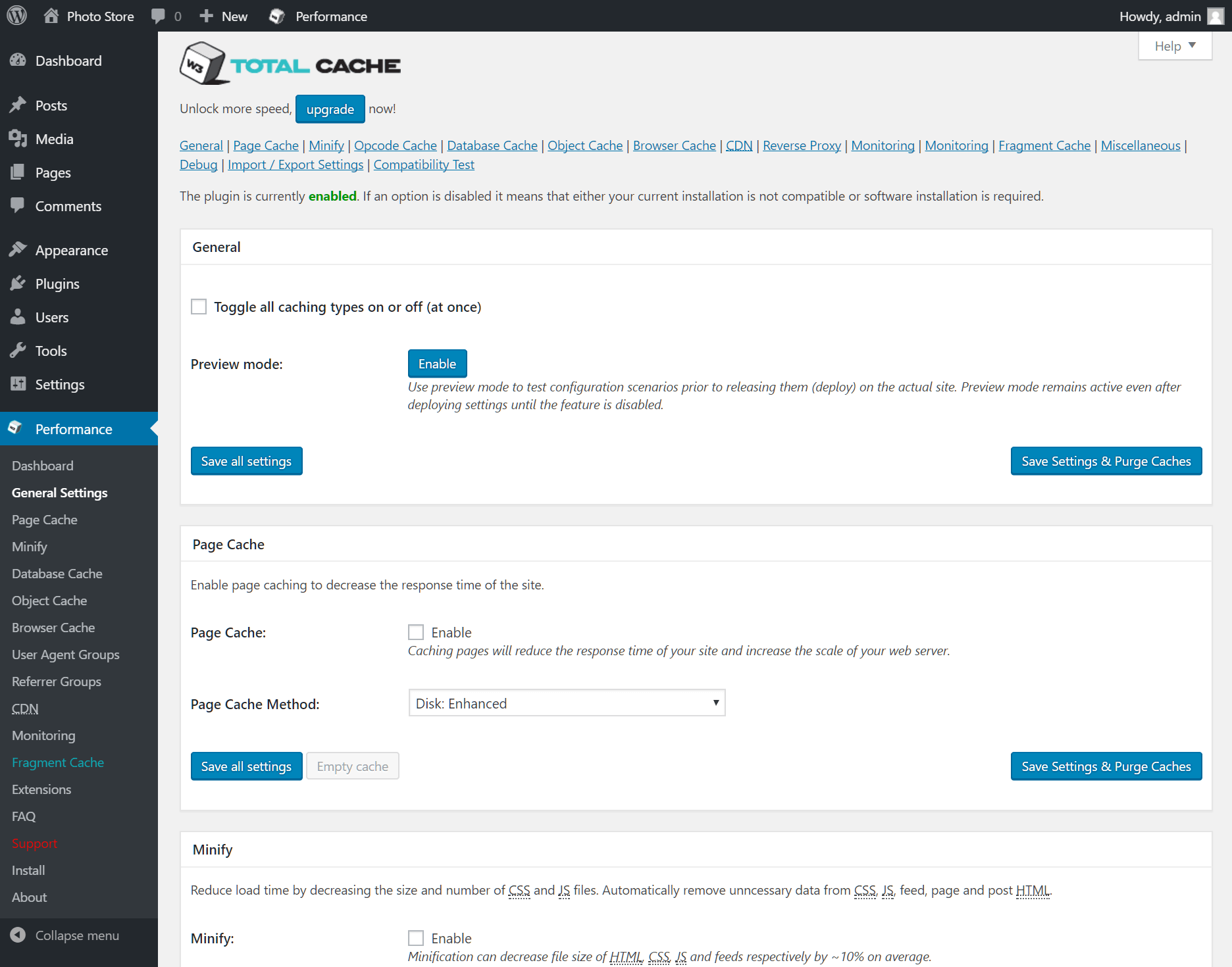
W3 Total Cache is a free, feature-rich caching plugin that has been a staple in the WordPress community for over a decade. It is designed for users who want granular control over their site’s performance optimization. W3 Total Cache supports a wide range of caching methods, including page caching, object caching, database caching, and browser caching. It also offers minification of HTML, CSS, and JavaScript files, as well as integration with CDNs and support for AMP (Accelerated Mobile Pages). While it has a steeper learning curve compared to other plugins, its extensive documentation and active community make it a powerful choice for developers and advanced users looking to fine-tune their site’s performance.
- Multiple Caching Methods: Supports page, object, database, and browser caching to optimize every aspect of your site’s performance.
- Minification and Compression: Reduces the size of HTML, CSS, and JavaScript files to speed up load times and reduce bandwidth usage.
- CDN Support: Integrates with popular CDNs like Cloudflare, MaxCDN, and Amazon CloudFront to deliver content faster to global audiences.
- AMP Support: Optimizes caching for Accelerated Mobile Pages, ensuring fast loading on mobile devices.
- Fragment Caching: Allows caching of specific parts of a page, which is useful for dynamic sites with personalized content.
3. WP Super Cache
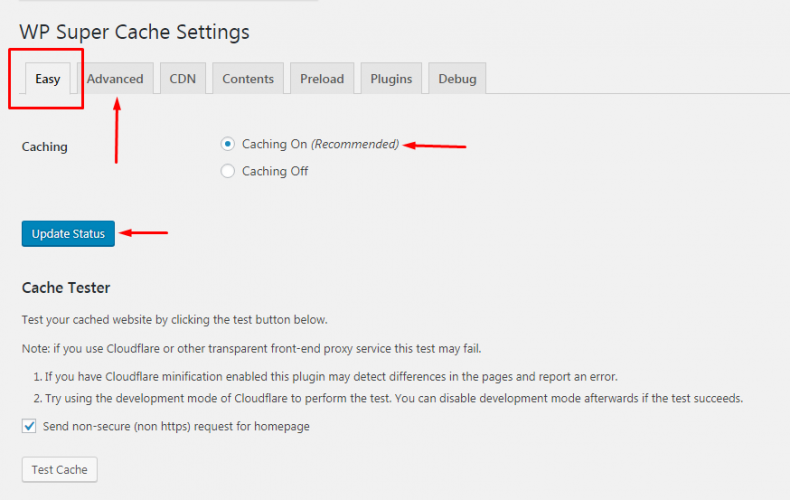
WP Super Cache is a free and straightforward caching plugin developed by Automattic, the team behind WordPress.com. It is designed to be simple yet effective, making it a great choice for beginners and users who want a no-fuss solution for speeding up their WordPress site. The plugin generates static HTML files from your dynamic WordPress content, which are then served to visitors instead of processing heavier PHP scripts. WP Super Cache offers three caching modes: Simple, Expert, and WP-Cache caching, allowing users to choose the level of optimization that best suits their needs. It also supports CDN integration and includes features like cache preloading and garbage collection to keep your site running smoothly.
- Static HTML File Generation: Converts dynamic WordPress pages into static HTML files, reducing server load and improving response times.
- Three Caching Modes: Offers Simple, Expert, and WP-Cache modes to cater to different levels of technical expertise and optimization needs.
- Cache Preloading: Preloads your site’s cache to ensure visitors always get the fastest possible experience, even for pages that haven’t been visited recently.
- Garbage Collection: Automatically cleans up old cached files to prevent your server from running out of storage space.
- CDN Support: Integrates with CDNs to deliver static files from servers closer to your visitors, further reducing load times.
4. LiteSpeed Cache
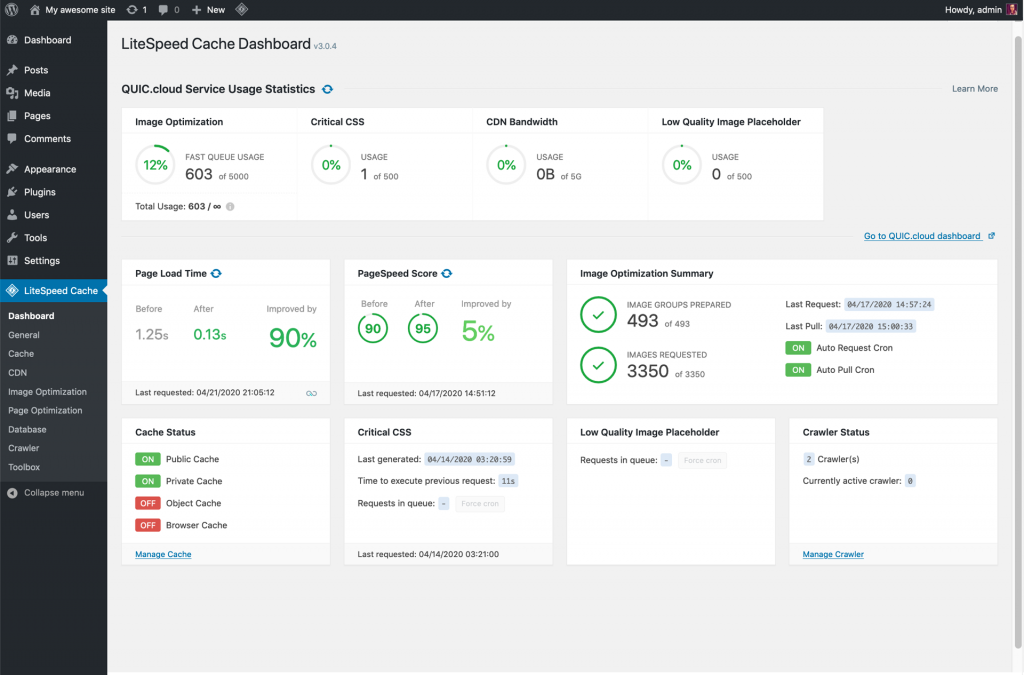
LiteSpeed Cache is a powerful, all-in-one caching plugin designed specifically for WordPress sites hosted on LiteSpeed servers. It offers a unique combination of server-level caching and advanced optimization features, making it one of the fastest caching solutions available. LiteSpeed Cache includes features like image optimization, database optimization, CSS and JavaScript minification, and lazy loading. It also supports HTTP/3 and QUIC protocols, which further enhance performance. One of its standout features is the ability to cache dynamic content, such as logged-in user pages, which is typically not possible with other caching plugins. While it works best on LiteSpeed servers, it can still provide significant performance improvements on other hosting environments.
- Server-Level Caching: Leverages LiteSpeed server technology to deliver ultra-fast caching at the server level, reducing the need for PHP processing.
- Dynamic Content Caching: Caches dynamic content, including pages for logged-in users, which is not possible with most other caching plugins.
- Image Optimization: Automatically optimizes images by converting them to WebP format and compressing them without losing quality.
- HTTP/3 and QUIC Support: Supports modern protocols like HTTP/3 and QUIC to further reduce latency and improve load times.
- Database Optimization: Cleans up and optimizes your WordPress database to improve overall site performance.
5. Cache Enabler

Cache Enabler is a lightweight and easy-to-use caching plugin developed by KeyCDN. It is designed to be simple yet effective, making it an excellent choice for users who want a no-frills solution for improving their site’s performance. The plugin generates static HTML files and stores them on the server’s disk, reducing the need for PHP processing and database queries. Cache Enabler also supports WebP image format, which can further reduce image file sizes and improve load times. Its minimalist settings panel makes it easy to configure, even for beginners. While it lacks some of the advanced features found in other plugins, its simplicity and efficiency make it a great option for small to medium-sized websites.
- Static HTML File Generation: Creates static HTML files to reduce server load and improve response times for visitors.
- WebP Image Support: Supports WebP image format, which offers better compression and smaller file sizes compared to traditional formats like JPEG and PNG.
- Minimalist Settings: Offers a simple and intuitive settings panel, making it easy to configure even for beginners.
- Cache Expiry: Allows you to set an expiry time for cached files, ensuring visitors always get the most up-to-date content.
- GZIP Pre-Compression: Pre-compresses cached files using GZIP to further reduce file sizes and improve load times.
6. Comet Cache
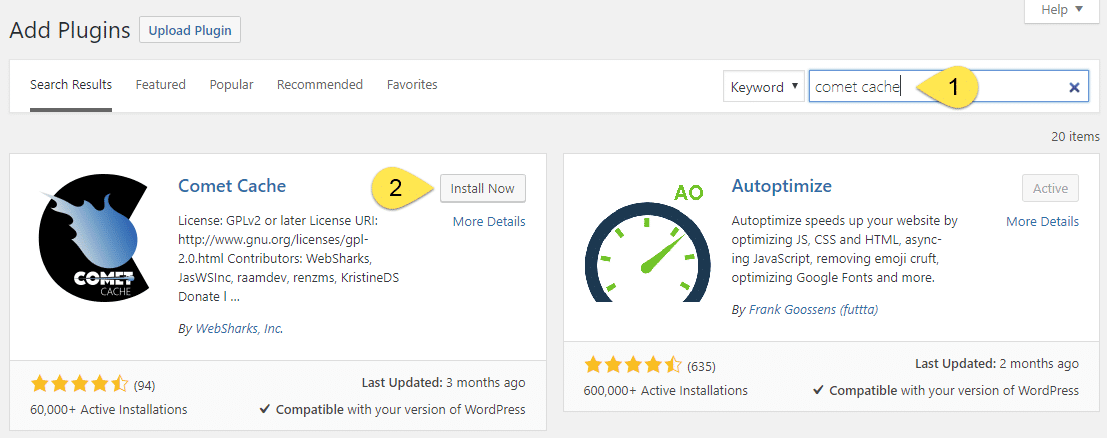
Comet Cache is a user-friendly caching plugin that offers both free and premium versions. It is designed to be easy to set up and use, making it a great choice for beginners and non-technical users. Comet Cache creates static HTML snapshots of your WordPress pages, which are then served to visitors instead of processing heavier PHP scripts. The plugin includes features like automatic cache clearing, client-side caching, and support for mobile devices. Its premium version adds advanced features like automatic cache preloading, CDN support, and the ability to cache logged-in users. Comet Cache also offers detailed documentation and excellent customer support, making it a reliable choice for users who want a hassle-free caching solution.
- Static HTML Snapshots: Generates static HTML files to reduce server load and improve response times for visitors.
- Automatic Cache Clearing: Automatically clears the cache when you update your site’s content, ensuring visitors always see the latest version.
- Client-Side Caching: Stores cached files on the visitor’s browser, reducing the need for repeated requests to the server.
- Mobile Support: Ensures that cached files are served correctly to mobile devices, improving performance for mobile users.
- Cache Preloading (Premium): Automatically preloads your site’s cache to ensure fast load times for all visitors, even for pages that haven’t been visited recently.
7. Hummingbird

Hummingbird is a comprehensive performance optimization plugin developed by WPMU DEV. It offers a wide range of features to speed up your WordPress site, including caching, minification, lazy loading, and database optimization. Hummingbird’s caching module includes page caching, browser caching, and Gravatar caching, ensuring that every aspect of your site is optimized for speed. The plugin also includes a performance scan tool that analyzes your site and provides actionable recommendations for improvement. Hummingbird integrates seamlessly with other WPMU DEV plugins and services, making it a great choice for users who want an all-in-one solution for optimizing their WordPress site. Its intuitive dashboard and detailed reporting make it easy to monitor and improve your site’s performance.
- Page and Browser Caching: Creates static HTML files and leverages browser caching to reduce server load and improve response times.
- Minification and Compression: Reduces the size of HTML, CSS, and JavaScript files to speed up load times and reduce bandwidth usage.
- Lazy Loading: Delays the loading of images and iframes until they are visible on the screen, reducing initial page load time.
- Performance Scan: Analyzes your site’s performance and provides actionable recommendations for improvement.
- Gravatar Caching: Caches Gravatar images to reduce the number of external requests and improve load times.
8. Breeze

Breeze is a free caching plugin developed by Cloudways, a popular managed WordPress hosting provider. It is designed to be lightweight and easy to use, making it a great choice for users who want a simple yet effective caching solution. Breeze offers features like page caching, browser caching, GZIP compression, and database optimization. It also includes minification of HTML, CSS, and JavaScript files, as well as support for CDN integration. One of Breeze’s standout features is its compatibility with Cloudways hosting, which allows for seamless integration and optimized performance. However, it works well on other hosting environments too, making it a versatile choice for a wide range of users.
- Page and Browser Caching: Creates static HTML files and leverages browser caching to reduce server load and improve response times.
- GZIP Compression: Compresses files to reduce their size and improve load times for visitors.
- Database Optimization: Cleans up and optimizes your WordPress database to improve overall site performance.
- Minification: Reduces the size of HTML, CSS, and JavaScript files to speed up load times and reduce bandwidth usage.
- CDN Integration: Supports integration with popular CDNs to deliver content faster to global audiences.
9. Swift Performance

Swift Performance is a premium caching plugin that offers a wide range of performance optimization features. It is designed to be highly customizable, making it a great choice for advanced users and developers who want fine-grained control over their site’s performance. Swift Performance includes features like page caching, browser caching, image optimization, and database optimization. It also offers advanced features like critical CSS generation, lazy loading, and support for HTTP/2. One of its standout features is the built-in plugin organizer, which allows you to disable unnecessary plugins on specific pages to reduce load times. Swift Performance also includes a performance test tool that helps you identify and fix performance bottlenecks on your site.
- Page and Browser Caching: Creates static HTML files and leverages browser caching to reduce server load and improve response times.
- Image Optimization: Automatically optimizes images by converting them to WebP format and compressing them without losing quality.
- Critical CSS Generation: Generates critical CSS to ensure that above-the-fold content loads quickly, improving perceived performance.
- Plugin Organizer: Allows you to disable unnecessary plugins on specific pages to reduce load times and improve performance.
- Performance Test Tool: Analyzes your site’s performance and provides actionable recommendations for improvement.
10. Autoptimize

Autoptimize is a free and lightweight optimization plugin that focuses on minifying and concatenating HTML, CSS, and JavaScript files. While it doesn’t offer traditional page caching, it works well in conjunction with other caching plugins to further improve your site’s performance. Autoptimize includes features like lazy loading for images, critical CSS generation, and the ability to defer JavaScript files. It also supports WebP image format and offers advanced options for fine-tuning your site’s optimization. Autoptimize is a great choice for users who want a simple yet effective solution for optimizing their site’s front-end performance. Its compatibility with other caching plugins makes it a versatile addition to any WordPress site.
- Minification and Concatenation: Reduces the size of HTML, CSS, and JavaScript files and combines them to reduce the number of requests to the server.
- Lazy Loading: Delays the loading of images and iframes until they are visible on the screen, reducing initial page load time.
- Critical CSS Generation: Generates critical CSS to ensure that above-the-fold content loads quickly, improving perceived performance.
- WebP Image Support: Supports WebP image format, which offers better compression and smaller file sizes compared to traditional formats like JPEG and PNG.
- JavaScript Deferral: Defers the loading of JavaScript files to prevent them from blocking the rendering of your page.
Frequently Asked Questions
What is a WordPress cache plugin and why do I need one?
A WordPress cache plugin is a tool that helps speed up your website by storing static versions of your pages and serving them to visitors instead of processing heavier PHP scripts and database queries every time. This reduces server load and improves response times, leading to a faster and more efficient website. Caching is essential for improving user experience, reducing bounce rates, and boosting your site’s search engine rankings. Without a caching plugin, your site may load slowly, especially during traffic spikes, which can frustrate visitors and hurt your business.
How do I choose the best WordPress cache plugin for my site?
Choosing the best WordPress cache plugin depends on your specific needs and technical expertise. If you’re a beginner, look for a plugin with an easy setup process and intuitive interface, like WP Rocket or WP Super Cache. If you’re an advanced user or developer, you might prefer a plugin with granular control over caching settings, like W3 Total Cache or Swift Performance. Consider factors like compatibility with your hosting environment, support for CDNs, and additional features like image optimization and database cleanup. It’s also a good idea to test a few plugins to see which one works best for your site.
Can I use multiple caching plugins at the same time?
No, it’s not recommended to use multiple caching plugins simultaneously. Caching plugins work by creating static versions of your pages, and using more than one can lead to conflicts, duplicate cached files, and even slower performance. Instead, choose one caching plugin that meets your needs and stick with it. If you want to combine caching with other optimization features, look for a plugin that offers a comprehensive suite of tools, like Hummingbird or LiteSpeed Cache. Alternatively, you can use a caching plugin alongside a minification plugin like Autoptimize to further improve performance.
Do caching plugins work with all types of hosting?
Most caching plugins work with a wide range of hosting environments, including shared hosting, VPS, and dedicated servers. However, some plugins are optimized for specific hosting providers. For example, LiteSpeed Cache works best on LiteSpeed servers, while Breeze is designed for Cloudways hosting. If you’re using managed WordPress hosting, check with your provider to see if they offer built-in caching solutions. Some hosts, like WP Engine and Kinsta, have their own caching systems and may restrict the use of third-party caching plugins. Always check compatibility before installing a caching plugin on your site.
How do I test if my caching plugin is working?
To test if your caching plugin is working, you can use tools like GTmetrix, Pingdom, or Google PageSpeed Insights to analyze your site’s performance before and after enabling the plugin. Look for improvements in metrics like load time, page size, and the number of requests. You can also check your site’s source code to see if the caching plugin has added headers like X-Cache or Cache-Control. Another way to test is to visit your site in a private or incognito browser window and check the response headers using your browser’s developer tools. If the caching plugin is working, you should see a significant reduction in load times.
What are the common issues with caching plugins and how can I fix them?
Common issues with caching plugins include conflicts with other plugins, broken layouts, and cached pages not updating. If you experience conflicts, try disabling other plugins one by one to identify the culprit. Broken layouts can often be fixed by clearing the cache or adjusting the plugin’s minification settings. If cached pages aren’t updating, check your plugin’s settings to ensure that cache clearing is enabled when you update content. Some plugins also offer a manual cache clearing option. If you’re still having issues, consult the plugin’s documentation or support forums for troubleshooting tips. It’s also a good idea to test your site after making changes to ensure everything is working correctly.
Are premium caching plugins worth the investment?
Premium caching plugins often offer advanced features, better performance, and dedicated support, which can be worth the investment for many users. Plugins like WP Rocket and Swift Performance include features like lazy loading, database optimization, and CDN integration, which can significantly improve your site’s speed and user experience. Premium plugins also tend to have more frequent updates and better compatibility with the latest WordPress versions. However, if you’re on a tight budget or have a simple site, a free plugin like WP Super Cache or Cache Enabler may be sufficient. Ultimately, the decision depends on your specific needs, technical expertise, and budget.


